LED Display Refresh Rate: 1920Hz vs. 3840Hz vs. 7680Hz
When we buy LED displays, we always see terms such as LED display refresh rate, grayscale, and contrast in the product specification of the merchant.
So what is the LED screen refresh rate? What effect will different LED wall refresh rates have on the display effect? This article will give you the answers.
There are currently two LED screen refresh rates in the display industry: 1920Hz refresh rate, and 3840Hz refresh rate. For some special application scenarios, the refresh rate of the LED display can reach 7680Hz.
What is the difference? Is the refresh rate of the display higher the better? Let’s read now!
Table of Contents
Quick Answer: Which LED Display Refresh Rate Should You Choose?
For most LED display projects, 3840Hz is the safest and most balanced choice. It offers better camera performance, smoother visual stability, and fewer flicker problems than 1920Hz, while still being more practical and cost-effective than 7680Hz for many commercial applications.
| LED Display Refresh Rate | Best For | Buyer Recommendation |
|---|---|---|
| 1920Hz | Outdoor advertising screens, basic commercial displays, long-distance viewing, budget projects | Choose this when the screen is mainly viewed by the naked eye and filming is not a key requirement. |
| 3840Hz | Indoor LED video walls, stage LED displays, conference rooms, exhibitions, shopping malls, sports bars, and event screens | This is the recommended refresh rate for most professional LED display projects because it balances visual quality, camera performance, and cost. |
| 7680Hz | XR studios, virtual production LED walls, broadcast studios, slow-motion filming, high-end 3D LED displays | Choose this only when camera shooting, high-speed filming, or broadcast-level visual stability is critical. |
In simple terms, 1920Hz can be enough for basic use, 3840Hz is the mainstream choice for professional LED screens, and 7680Hz is mainly used for high-end filming and virtual production scenarios. The higher refresh rate is not always necessary, but the right refresh rate can reduce flicker, scan lines, and camera banding.
1. What is the LED Display Refresh Rate?
In simple terms, the LED display refresh rate refers to the times the electron beam repeatedly scans the image on the LED screen. Its unit is Hz. The refresh rate represents the number of times the screen is refreshed per second.
The refresh rate is a parameter indicative of the LED display device itself. And it is also an important indicator to characterize the stability and non-flickering of the LED video wall.
Therefore, the higher the refresh rate of the LED screen, the better the stability of the displayed images and videos. So the refresh rate will affect the price of the display.
It is worth noting that the refresh rate and resolution restrict each other, so the LED display screen with high resolution and high refresh rate is more beautiful.
The higher the refresh rate, the faster the screen updates. The more stable the screen display, the smaller the visual flicker.
LED walls with low refresh rates will produce horizontal stripes when taking pictures. Flashing images at the same time can cause visual fatigue to the human eye.
What is the frame rate?
It is easy to confuse the concepts of frame rate and refresh rate. The frame change frequency unit is also Hz, which refers to the number of times the picture information is updated per second. Simply put, it means how many frames per second the video has.
For example, when we watch a video on the LED screen, the images are still.
It is familiar with slides. Due to the visual dwell effect of human eyes, if the dwell time of the two pictures is shortened, the coherence of the video will be better.
The frame rate is generally 25Hz, 30Hz, 50Hz, 60Hz, etc. The higher the frame rate, the better the continuity of the changed image.
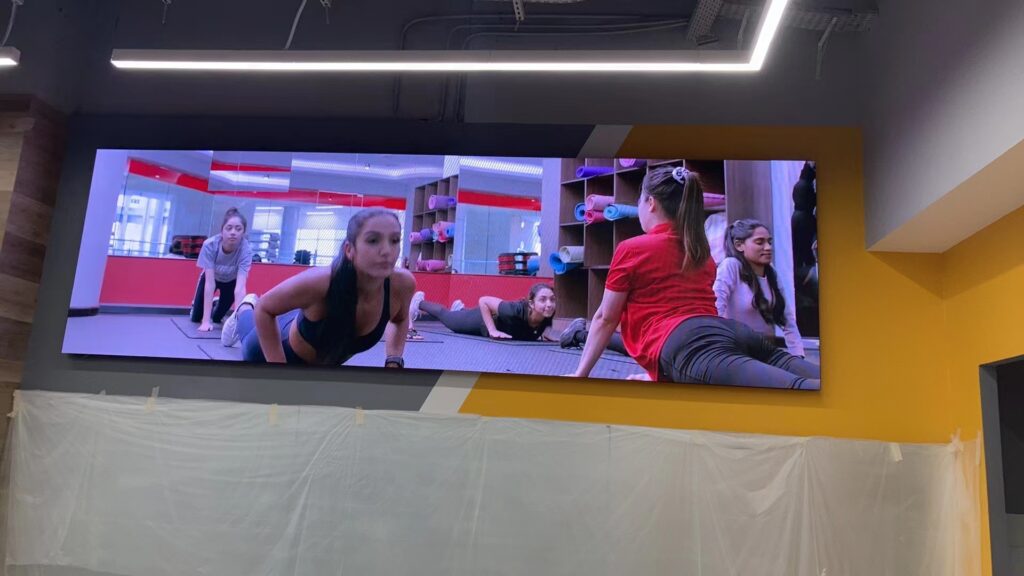
The frame rate of the program source and the led screen refresh rate will affect the image quality. The two are complementary.
For instance, we play a movie with a frame rate of 24Hz on a led video wall with a refresh rate of 3840Hz.
Then each frame of the movie is refreshed 3840/24=160 times by the display screen. The human eye cannot perceive such a fast picture flickering, so the fluency of the video on the led screen is good.
2. 1920Hz VS. 3840Hz VS. 7680Hz Refresh Rate
I believe that many users have encountered such a situation: for the same display screen, it is clear to the naked eye.
But when shooting with a mobile phone or camera, there are always some irregular stripes in the picture. It may be caused by the low refresh rate of the screen.
At present, in the LED display screen industry, two main display refresh rates are 1920Hz refresh rate and 3840Hz refresh rate.
The display screen with a 960Hz refresh rate has gradually faded out of people’s sight due to the flickering and shaking of the screen and the poor display effect.
2.1 Differences between 1920hz refresh rate and 3840hz refresh rate
(1) Display effect. The higher the refresh frequency, the faster the screen refreshes, and the clearer the image seen by the human eye.
The refresh rate of the high-brush display can reach 3840Hz, and the normal refresh rate is 1920Hz.
The difference between the two displays is indistinguishable to the naked eye when playing pictures and videos.
But it can be seen using mobile phones and high-definition devices.
http://wp.luotec.com/wp-content/uploads/2022/08/3840Hz-VS-1920Hz.mp4
3840hz refresh rate VS 1920hz refresh rate
(2) Shooting effect. The display screen with a 1920hz refresh rate will have obvious water ripples when the mobile phone takes pictures.
And the image will shake and flicker. However, the led video wall with a 3840hz refresh rate can meet higher shooting requirements, ensure the shooting effect, and reduce the phenomenon of water ripples.
(3) Visual experience. Flickering and shaking the screen will cause visual fatigue.
Prolonged viewing is not good for the eyes. Compared with 1920hz, 3840hz refresh rate led display is less harmful to eyes.
(4) Price. The higher the refresh rate, the better the corresponding IC and configuration quality.
The cost between the 1920hz refresh rate and the 3840hz refresh rate is different. You can choose according to your needs and budget.
2.2 Advantages of choosing 3840hz refresh rate
(1) The picture texture is clear and delicate, the color is vivid, and the degree of reduction is high. With high-quality program sources, the publicity effect is better.
(2) The 3840hz refresh rate can meet the shooting and photography requirements. A high refresh display is more suitable.
For example, some large-scale parties, press conferences, and other occasions need to be televised or broadcast live.
For example, when broadcasting NBA basketball games, the camera equipment needs to shoot the funnel-shaped LED video scoreboard. A high refresh rate led display can present a better picture effect.
(3) The high-brush display is more eye-friendly and less harmful to the eyes. The viewing experience for the audience is better.
(4) LED display with high refresh rate has gradually become the mainstream of the LED screen industry.
Application areas include conference rooms, party stages, command centers, exhibition halls, museums, gymnasiums, hotels, and other places.
https://www.youtube.com/watch?v=L6fU2hreNZY&t=4s
Fine Pixel LED Display With 3840Hz Refresh Rate
In the field of film and television production and live broadcast, in order to obtain more detailed pictures (excellent playback or close-up shots), high-speed cameras with a frequency of more than 1,000 Hz per second are adopted.
At this time, for the LED display screen that will also be photographed, it is a big challenge to still be able to present continuous images (without black scanning lines) or continuous color levels under high-speed shutter speeds.
This is why LED displays used for live broadcasts or broadcasts require high refresh rates and high gray scales.
Currently, customers generally choose 3840Hz displays to obtain stable image effects. There will be no ripples or flickering when taking pictures.
The high refresh rate can effectively solve the smearing and blurring of images during fast motion. Make the video picture smooth and smooth by enhancing the clarity and contrast of the image.
3. 7680Hz VS. 120Hz: What’s the Difference?
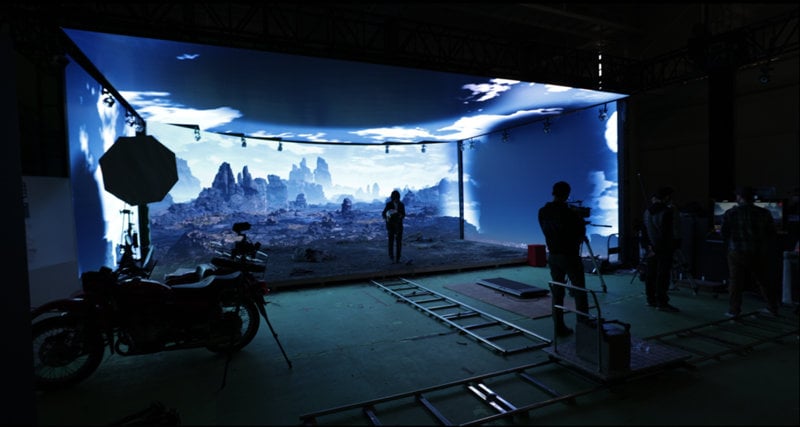
With the development of virtual production LED display in film and television production, the LED refresh rate has developed to 7680Hz. The high refresh screen brings a smoother visual experience.
When understanding the refresh rate parameters of different types of screens, have you ever been confused by the two values of 7680Hz and 120Hz? Let’s take you to understand their differences.
(1) Difference Types of Screen
7680Hz is used for LED displays.
120Hz is commonly used in LCD/OLED backlit displays. For example, the current screen refresh rate of high-end smartphones is 120Hz.
(2) Imaging Principle
The LED display screen refreshes the picture by lighting up and extinguishing the light-emitting chips line by line, thereby forming a video-imaging effect.
LCD/OLED displays achieve coherent video imaging effects by quickly switching between different images per second.
(3) Definition
7680Hz represents the scanning frequency of the display. It indicates that the light-emitting chip is refreshed 7680 times per second.
120Hz represents the frame-changing frequency of the display. In other words, the display refreshes 120 different frames in 1 second.
(4) Influencing Factors
7680Hz represents the refresh rate of the screen itself. It is determined by the driver IC and light board design.
120Hz represents the frame rate of the film source. It is determined by the media itself and the graphics card.
High resolution LED display provides smoother pictures and better shooting effects.
It not only brings users the ultimate smooth visual experience but also can adapt to the extremely high requirements for display screens in different current application scenarios.
XR, virtual production LED wall, immersive experience check-in, etc. have gradually become hot market applications. These scenarios have higher requirements for LED wall refresh rate.
4. How to Improve LED Screen Refresh Rate?
Through the above information, we have understood the importance of led screen refresh rate to image quality.
So how to get a high led screen refresh rate? How to get a high-resolution led display screen?
More LED display manufacturers use high-brush PWM driver ICs to improve the refresh rate of LED displays.
Regular displays can reach a 1920hz refresh rate. A fine pixel pitch LED display can reach a 3840hz refresh rate.
High-quality driver ICs help achieve high refresh rates, gray levels, and image expressiveness. With the advancement of driver IC manufacturers’ technology, mid-to-high-end LED displays have been able to achieve a balance between the three aspects.
5. Is the Higher the LED Wall Refresh Rate the Better?
Is the higher the refresh rate of the full-color led display, the better? The answer is no. The way of use is different, and the focus on the performance indicators of the led screen is also different.
Firstly, for the naked eye, the visual refresh rate above 60Hz has been perceived as a continuous picture, but the viewing experience with a high refresh rate is indeed better.
When the refresh rates of video sources and LED screens increase simultaneously, it is difficult for the human eye or even high-speed cameras to catch the flicker. Therefore, high frame rate video sources played on a high refresh display can greatly improve the stability of frame changing and achieve a 1+1>2 display effect.
Secondly, the cost of high-brush LED screens is higher than that of low-refresh LED screens. The high-brush led screen can meet the needs of close-up photography, lens playback, etc.
6. What Affects the LED Display Refresh Rate and Gray Scale?
As we all know, the quality of the core components of the LED display will directly affect the display effect of the screen. For example, power supply, driver chip, LED lamp beads, etc.
For the refresh rate and gray scale of the LED display, the LED driver chip directly determines the visual performance of the display.
Among the current LED driver chips, the latest technology is “ScrambledPWM (S-PWM) technology”.
S-PWM technology is a technology that improves the traditional pulse width modulation (PWM). into several shorter on-times to increase the overall visual update rate.
The LED display screen of the S-PWM driver chip is photographed with a high-speed shutter of a digital camera, and there will still be no horizontal black scanning lines and color block distribution.
Its visual refresh rate and grayscale performance are far superior to LED displays using traditional switch-type driver chips.
7. Where High Refresh Rate LED Screen is Needed?
High refresh rate LED screens are essential in certain situations. This is to ensure smooth visuals and prevent visual artifacts such as flickering or motion blur.
The following are some of the situations where high refresh rate LED screens are needed:
(1) Live Broadcasting and Filming
When using LED screens as a background for filming in the studio, high refresh rate LED displays are a must.
If the screen refresh rate does not match the camera frame rate, low refresh rates can cause camera flickering.
High refresh rates (usually 3,840Hz or higher) eliminate flickering and ensure smooth visuals.
(2) Stadiums
In stadiums and arenas, high refresh rate LED screens are essential for showing fast-paced action without motion blur.
The clarity and smoothness of the screen ensure that the audience can accurately follow the action.
(3) Events and Concerts
In events such as concerts or exhibitions that use dynamic visuals or lighting effects, high refresh rates help create smooth transitions and animations.
(4) Gaming and E-sports
For E-sports or gaming applications, high refresh rates are important to avoid lag, screen tearing, and motion blur.
Gamers need fast and smooth screen response to maintain accuracy and immersive experience.
(5) Outdoor Advertising
In areas with high traffic, especially outdoors, high refresh rate displays help maintain clear and consistent visual quality when people move quickly.
3D billboards generally use high refresh rate small pitch LED displays to achieve better image effects.
This is also convenient for pedestrians to take photos and upload them to the Internet. The viral spread effect will take advertising marketing to a higher level.
https://youtu.be/93Wgct3EiFI?si=cNrG3FOqmYu46_Pu
(6) Virtual and Augmented Reality
Seamless interaction in AR and VR environments requires high refresh rates.
Delay or flickering can destroy immersion, so higher refresh rates can improve realism and interactivity.
In short, for applications involving filming, live events, fast sports, games or high-end advertising, you need high refresh rate LED screens.
In these cases, high refresh rates can enhance the visual experience by providing smoother, flicker-free display images. At the same time, it can ensure better performance in capturing fast-moving visuals.
8. How LED Display Refresh Rate Is Affected by Control Card Loading Capacity?
In an LED display system, the loading capacity of the control card plays a key role in determining image clarity, smoothness, and overall display performance.
Understanding the relationship between control card pixel loading limits and refresh rate is essential for achieving optimal display results.
(1) What Is Control Card Loading Capacity?
Each control card has a specific pixel loading limit, often defined by the number of pixels it can drive both horizontally and vertically.
Failing to adhere to these limits can result in display anomalies such as flickering, image distortion, or even failure to display.
For example, a 12-port control card might support a horizontal loading capacity of 128 pixels and a vertical capacity of 576 pixels.
However, how many modules it can control depends on the pixel configuration of the individual LED modules.
(2) Example Calculations Based on Different LED Module Specs
P2.5 Indoor LED Module (128×64 pixels)
Horizontal: 128 pixels (equals control card’s horizontal limit), so only 1 module can be connected horizontally.
Vertical: 576 ÷ 64 = 9 modules can be stacked vertically.
P4 Indoor LED Module (80×40 pixels)
Horizontal: Two modules equal 160 pixels, which exceeds the 128-pixel limit. You can only connect 1 module horizontally unless vertical quantity is reduced to balance the load.
Vertical: 576 ÷ 40 = 14.4. In practice, you can connect up to 12 modules vertically, totaling 480 vertical pixels—still within limit.
These examples highlight the importance of matching control cards with suitable LED modules to prevent overloading and ensure consistent performance.
(3) Horizontal Loading Capacity Affects Refresh Rate
The horizontal loading of a control card significantly impacts the refresh rate. Here’s why:
The refresh rate depends on how quickly the control card can transmit image data across all horizontal pixels.
When horizontal pixel loading is too high, data transmission slows down, reducing the refresh rate.
This can lead to flickering, ghosting, or blurry images, especially during video playback or live feeds.
Key Point: The lower the horizontal load, the easier it is for the control card to maintain a high refresh rate, ensuring smooth, stable image output.
(4) Vertical Loading Capacity Has Minimal Impact on Refresh Rate
In contrast, vertical pixel loading has little to no effect on refresh rate. This is due to:
The use of time-division scanning (e.g., 1/4 or 1/8 scan) in vertical driving.
Vertical data is processed in batches and not all at once, reducing transmission bottlenecks.
Even at full vertical load, as long as power and processing limits are respected, the refresh rate remains stable.
Pro Tip: You can safely utilize the full vertical capacity of the control card to build larger screens without affecting image fluidity.
(5) Best Practices to Maintain High Refresh Rates
Match the control card capacity with LED module resolution carefully.
Avoid overloading horizontal pixels, as this has the greatest impact on refresh performance.
Use high-performance control cards for large, high-resolution displays.
Consider distributing loads across multiple control cards for ultra-large LED video walls.
9. How to Avoid LED Screen Flicker and Scan Lines on Camera
The best way to avoid LED screen flicker on camera is to choose the right refresh rate and test the LED display with the actual camera before final installation.
Many LED screens look normal to the naked eye, but when they are filmed by a phone, DSLR camera, broadcast camera, or high-speed camera, horizontal lines, rolling bands, water ripples, or flickering may appear.
9.1 Choose 3840Hz or Higher for Camera-Facing LED Screens
If the LED screen will often appear in videos, photos, live streams, events, concerts, sports broadcasts, or social media content, 3840Hz is usually a better choice than 1920Hz. A 3840Hz LED display can reduce visible flicker and scan lines in most common shooting environments.
For high-end applications such as XR studios, virtual production, broadcast studios, and slow-motion filming, 7680Hz may be a better option because the camera system is more sensitive to refresh rate, scan rate, grayscale performance, and shutter settings.
9.2 Match Camera Settings With the LED Display
Refresh rate is important, but it is not the only factor. Camera frame rate, shutter speed, exposure, brightness level, and LED control system settings can also affect the final image. If the shutter speed does not work well with the LED screen refresh behavior, the camera may still capture flicker or dark scan bands.
- Test the LED display with the real camera that will be used on site.
- Check the screen at different brightness levels, not only at full brightness.
- Adjust shutter speed and frame rate before filming or live broadcasting.
- Use a high-quality LED control system and receiving card configuration.
- Ask the supplier to provide a real camera test video before confirming the order.
10. LED Display Refresh Rate Buyer Checklist
Before buying an LED display, do not only ask whether the screen supports 1920Hz, 3840Hz, or 7680Hz. A reliable refresh rate depends on the full LED display system, including LED modules, driver ICs, receiving cards, control cards, scan ratio, grayscale performance, and real installation conditions.
Use the checklist below when comparing LED display quotations from different suppliers.
10.1 Confirm the Real Refresh Rate
- Is the LED display refresh rate 1920Hz, 3840Hz, or 7680Hz?
- Is this value tested under normal brightness and real working conditions?
- Can the supplier provide a camera test video instead of only a specification sheet?
- Is the refresh rate suitable for your application, such as advertising, stage, sports, conference, broadcast, or XR?
10.2 Check the Driver IC and Module Design
- What driver IC does the LED display use?
- Does the driver IC support high refresh rate and high grayscale at the same time?
- Will the screen maintain stable image quality at low brightness?
- Is the LED module designed for basic viewing, professional filming, or high-end broadcast use?
10.3. Review the Control System Configurationn
- What sending card, receiving card, or control card is used?
- Is the horizontal loading capacity suitable for the LED module resolution?
- Will the control card be overloaded after the screen size is expanded?
- For large LED video walls, will multiple receiving cards or control cards be used to maintain refresh performance?
10.4. Match Refresh Rate With the Real Application
| Application | Recommended Refresh Rate | Why It Matters |
|---|---|---|
| Outdoor advertising LED display | 1920Hz or 3840Hz | 1920Hz can be enough for basic viewing, while 3840Hz is better if people often take photos or videos of the screen. |
| Indoor LED screen | 3840Hz | Indoor screens are viewed at a closer distance and are often filmed by phones or cameras. |
| Stage LED display and rental LED screen | 3840Hz or higher | Stage screens need smoother dynamic visuals and better camera performance during events and live shows. |
| Sports LED display | 3840Hz or higher | Fast motion, live broadcasting, and camera shooting require stable and smooth image performance. |
| XR studio or virtual production LED wall | 7680Hz | High-end filming environments are more sensitive to flicker, scan lines, camera shutter speed, and grayscale performance. |
10.5. Ask for a Real Test Before Final Confirmation
A good LED display supplier should be able to test the screen with real content, different brightness levels, and camera shooting conditions. If the project will be used for filming, live streaming, sports events, concerts, or virtual production, ask for a test video before mass production or final delivery.
This simple step can help you avoid hidden problems such as camera flicker, horizontal scan lines, unstable grayscale, poor low-brightness performance, and overloaded control card configuration.
9. Conclusion
This article has compiled some information about the LED display refresh rate for you. It includes a comparison of different LED screen refresh rates: 1920hz refresh rate, 3840hz refresh rate, and 7680Hz. If you have any questions about the LED display, contact us.