Novastar Calibration: How to Do It Quickly and Accurately?
Imagine here is an easy way for you to let your LED display, which fails to display the content uniformly, such as some parts of the screen showing different brightness or color, to become more pleasing to your eyes in a matter of minutes. Now, it can be achieved by Novastar calibration by yourself! The only thing you need to do is follow this post to fix the problem.
What is Novastar calibration, and how can it? In this article, we will bring you to know the benefits of LED screen calibration, and provide detailed instructions for you to manually adjust it all by yourself! Do not worry, as we will straightforwardly explain the whole process!
Before we begin, we need to know exactly what LED display screen calibration is and why we need LED display calibration.
Table of Contents
1. What is LED Display Calibration?
LED display calibration is the process of adjusting and fine-tuning LED screens to achieve uniform brightness, color accuracy, and gray scale consistency across all modules.
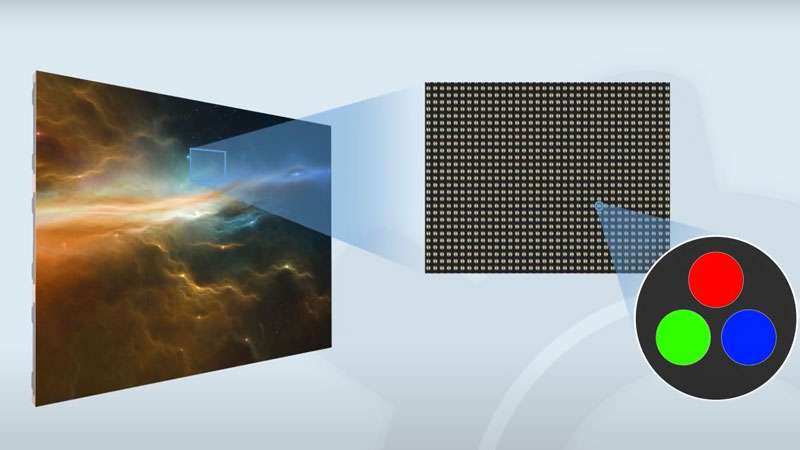
LED displays, by their nature, exhibit inherent variations:
Module/LED Cabinet Differences: Manufacturing tolerances result in slight color and brightness variations between modules or individual LEDs.
There is an acceptable tolerance range of wavelength for displays produced in factories. Generally, the range can be 10nm, meaning that if the target red color has a wavelength of 700nm, an LED display screen could be 705nm or 695nm. However, our humans can detect a color shift of about 2.5-3.5nm, meaning if two LED lamp brads that are placed next to each other with 700nm and 697nm separately will be different in color for viewers.
Environmental Factors: Temperature fluctuations and aging affect LED performance over time.
Viewing Angle Variance: Color and brightness can shift depending on the audience’s perspective.
System-Level Integration: Processors, sending cards, and power supplies introduce potential inconsistencies.
Thus, we need LED display calibration to make sure we can get a final unified display performance. Without sophisticated calibration, such as Novastar’s, these variations create visible “patchiness,” inaccurate colors, and an overall unprofessional appearance. Novastar Calibration eliminates these issues systematically.
Typically, your LED display manufacturer should finish the calibration process before delivering the products to you, but some irresponsible manufacturers may just skip this step, so your screen will not be uniform in brightness or color.
2. Why Calibration is Essential for LED Screen?
As mentioned above, during manufacturing and installation, even slight variations in LED chips, aging, or environmental factors can cause visual inconsistencies, such as patchy colors, uneven brightness, or unnatural gradients. Calibration eliminates these issues by aligning each pixel’s performance to a common visual standard.
Imagine a high-end retail display where the vibrant red of a luxury product looks dull and inconsistent across the screen. Consider a critical control room where an inaccurate color representation could lead to misinterpretation. These aren’t mere annoyances; they are brand-damaging, message-distorting, and potentially costly failures.
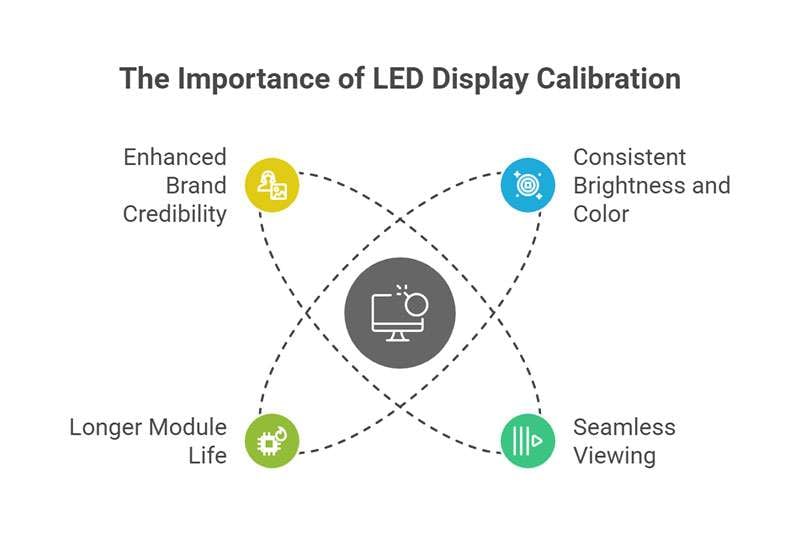
Here are some reasons why calibration matters for LED displays:
① Consistent Brightness and Color
One of the most common complaints in large LED display installations is uneven brightness, especially when mixing modules from different batches. Calibration ensures brightness variation drops below ±1% and chromaticity variance stays under ΔE 0.003 for color accuracy.
② Seamless Viewing Without Visual Artifacts
Without calibration, lines can appear between cabinets, and modules may have subtle color differences. Proper calibration removes these flaws, key for retail displays and broadcast screens, where any glitch harms your image.
③ Longer Module Life
Calibrated settings help regulate LED drive voltages and thermal behavior. This avoids excessive drive current on weak LEDs, extending panel lifespan and reducing energy use long-term.
④ Enhanced Brand Credibility
For brands or AV integrators, a perfectly calibrated screen demonstrates professionalism. Whether it’s a luxury retail facade or a high-stakes command center, flawless image quality inspires trust.
3. What is Novastar Calibration?
Novastar, a leading provider of LED display control systems, offers advanced software and hardware tools for professional-level display calibration.
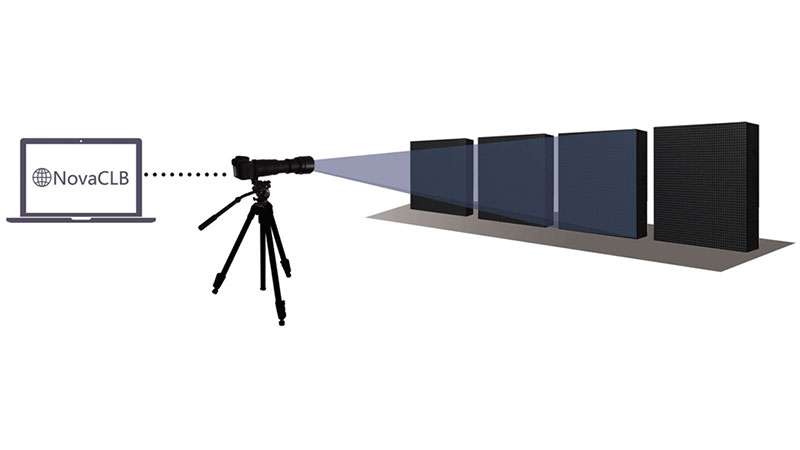
Novastar calibration refers to the process of adjusting and fine-tuning LED display panels using the Novastar calibration system (including NovaLCT, SmartLCT, and the NovaCLB camera-based system) to accurately measure and adjust each LED module’s brightness, color temperature, and gamma settings.
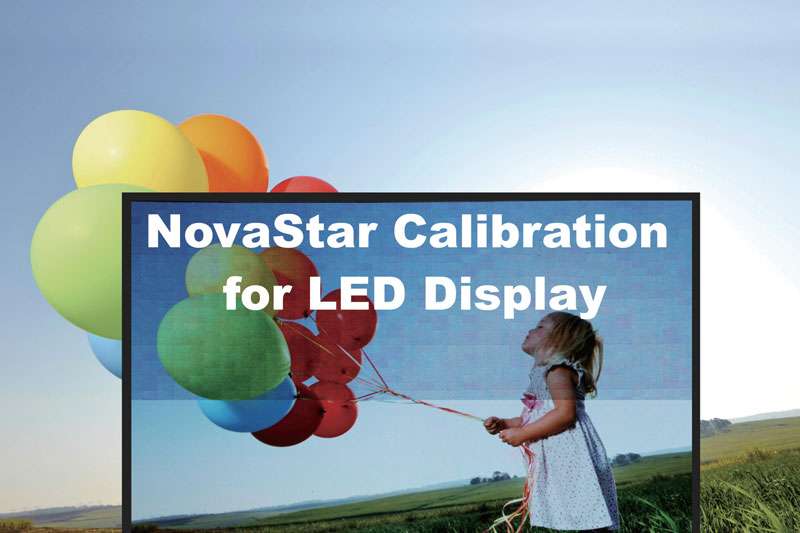
The LED display calibration process involves reading and compensating for inconsistencies in:
Brightness levels
Color temperature
Gamma values
Grayscale performance
By calibrating these parameters, you can eliminate issues like:
Visible module boundaries
Color shifting
Uneven brightness
This level of precision often achieves brightness variance under ±1% and color deviation below ΔE 0.003, which means calibrated LED walls look flawless whether viewed live or through broadcast cameras. Beyond visual perfection, calibration also reduces over-driving weaker LEDs, extending module lifespan and lowering maintenance.
4. Novastar Calibration Solutions
Novastar Calibration solutions include both production-line calibration and on-site calibration:
4.1 Production-line Calibration
Production-line calibration involves calibrating each display panel before shipment, ensuring consistent display quality even when spliced together on-site. Three solutions are available for different applications.
① Conventional Cabinet Calibration Solution:
Simple and efficient, with one-click activation and a fully automated process, it allows for easy splicing of any panel.
② Rental Application Calibration Solution:
Conventional cabinet calibration combined with a colorimeter ensures consistent splicing of cabinets with varying age and batches in rental applications.
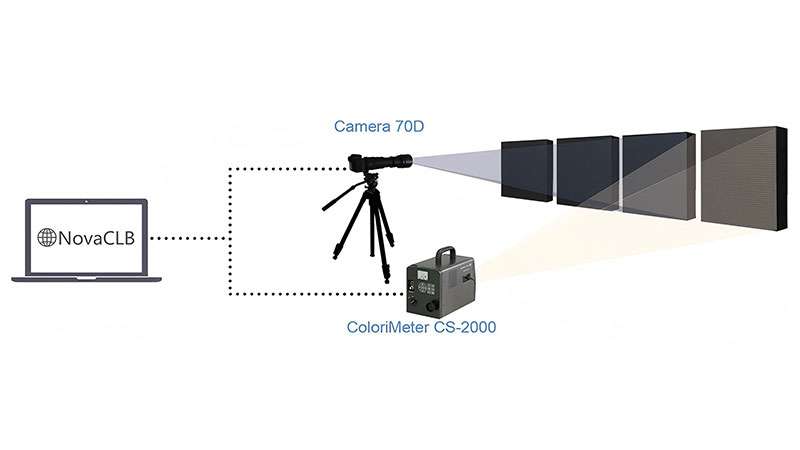
③ Supplementary Order Calibration Solution:
By incorporating the accuracy of human eye adjustment into the calibration process, the accuracy far exceeds that of professional spectrophotometers, enabling industry-leading results for supplementary order splicing.
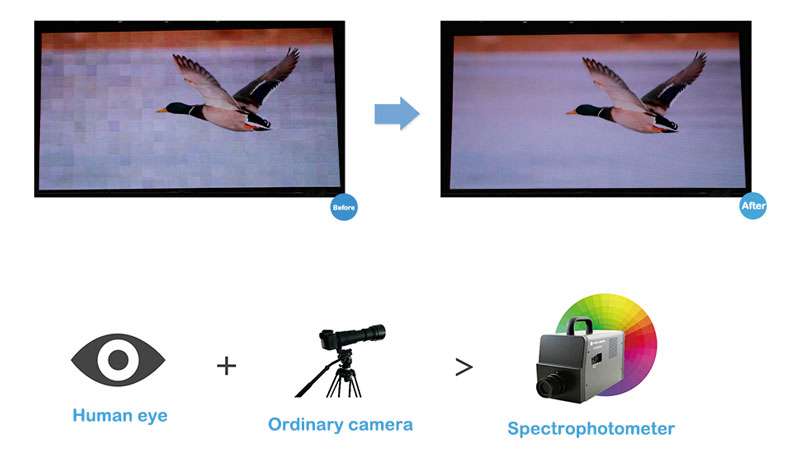
4.2 On-site Calibration
① Curved LED Screen Calibration Solution
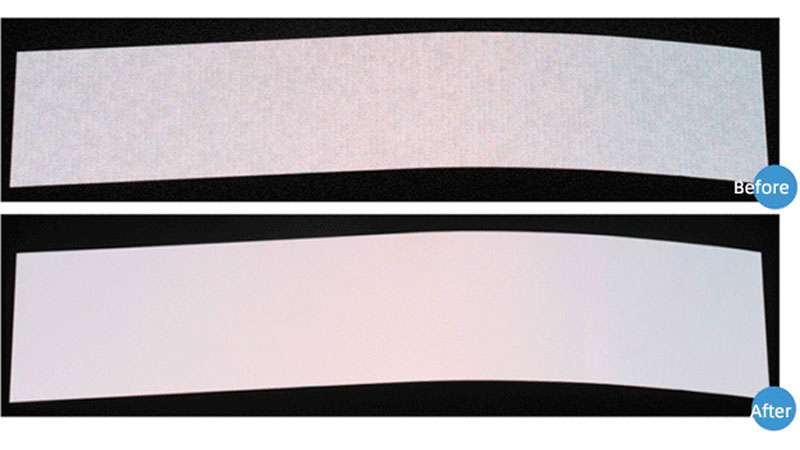 Beijing Zhongguancun Hailong Building (L: 78.36m·500m², P20)
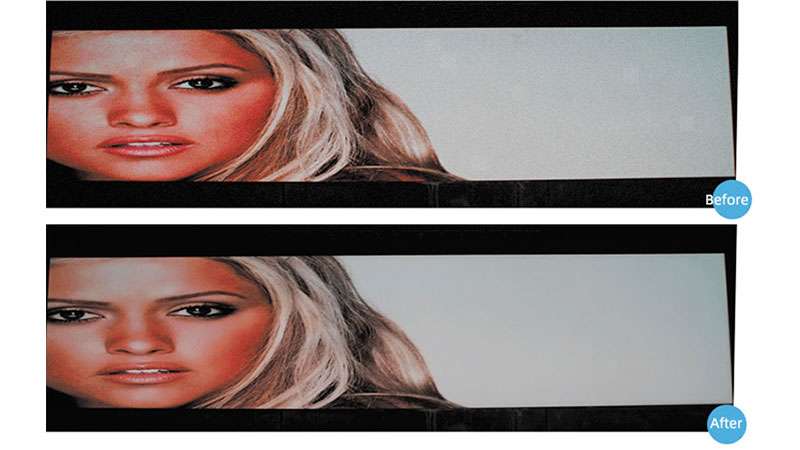
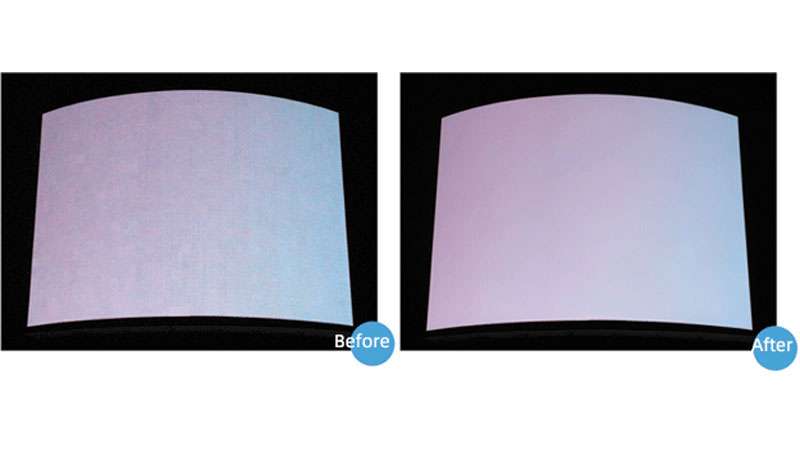 Luoyang Zhilong Plaza (105m², P13) Before and After Calibration
② Special-Shaped Screen Calibration Solution

③ Large LED Screen Calibration Solution
5. Benefits of Novastar Calibration
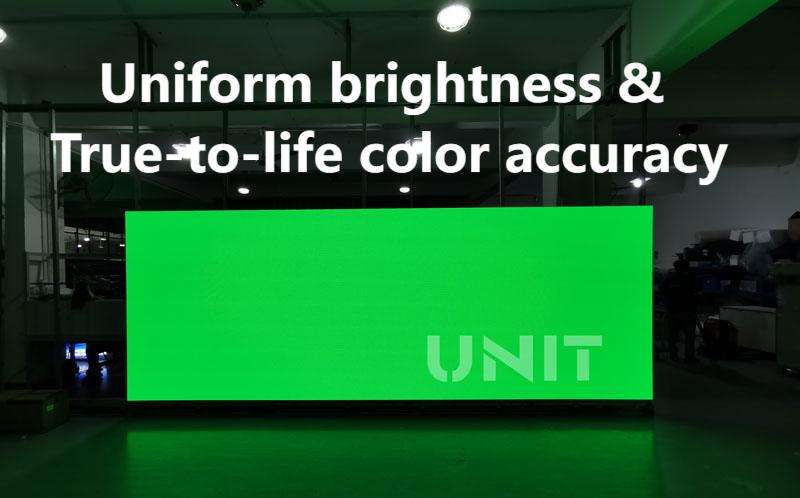
For integrators, event managers, and digital signage providers, NovaStar calibration ensures each pixel is finely tuned for uniform brightness and true-to-life color accuracy across the entire screen. The result is a seamless, high-impact image that maximizes visual performance in any setting.
① Uniform Brightness & Color: LED display calibration balances each module’s output so every pixel matches its neighbor. NovaStar’s system achieves <1% brightness variance and near-zero color deviation, giving viewers a seamless, high-impact image.
② Superior Visual Performance: Calibrated panels deliver vibrant, consistent images, maximizing visual impact and gamma precision. NovaStar Caliris calibration can “eliminate[s] color difference perfectly” to create a “more exquisite, more transparent” display, resulting in sharper, more immersive visuals for every live event or installation.
③ Seamless NovaStar Integration: Calibration works hand-in-hand with the NovaStar control system. The Nova M3 controller and NovaCLB suite form a closed-loop solution, applying precise 12 to 16-bit correction data directly to the hardware. This unified ecosystem ensures consistent output across all LED modules and screen configurations.
④ Fast, Efficient Setup: Calibration is quick and user-friendly. NovaStar offers one-key auto-calibration with high throughput (tens of thousands of pixels per hour), letting crews refresh displays with minimal downtime. Even non-experts can easily fix issues like seam lines or mismatched cabinets on-site.
⑤ Long-Term Reliability: NovaStar calibration compensates for LED aging and batch variations, guaranteeing lasting performance. Over 1.5 million square meters of displays have been field-calibrated by NovaStar, proving this approach extends screen life and lowers maintenance needs.
Novastar Calibration Benefits at a Glance:
| Benefit | Description |
| Uniformity | Eliminates brightness and color variance across modules |
| Color Accuracy | Enables precise RGB balance and gamma control |
| Seamless Display | Removes visual lines and mismatched edges |
| VideoFriendly | Achieves high refresh rates (≥3840 Hz) for flicker-free camera capture |
| Longevity | Reduces overdrive, improving LED life and efficiency |
| Brand Credibility | Supports professional image in high-stakes environments |
6. Novastar Calibration Tools & Software You Need
Unlock professional-grade LED display uniformity and color accuracy with Novastar Calibration, designed for seamless calibration at cabinet and full-screen levels. Here are some tools or software you need:
NovaLCT (LED Control Software)
Screen configuration: resolution, scan mode, drive current
Module-level parameters: brightness, offset, and gamma
Real-time monitoring: temperature, voltage, and signal status
SmartLCT (Calibration Module)
One-click calibration for individual cabinets or full-screen arrays
Batch adjustment: match multiple production batches seamlessly
Coefficient management: import/export calibration data
NovaStar Calibration Systems
① NovaStar Standard Calibration System
A universal calibration solution for all LED displays, delivering superior calibration results at a competitive cost. Features include:
- Advanced Bright/Dark Link Correction
- One-key start, simple and user-friendly initiation.
- Maximum pixels for one calibration: 192×128
- Maximum area for one calibration: 2K×1K
- Rapid Processing: Achieves speeds of approximately 1 minute per cabinet, or 2 million pixels per hour.
- Supports both individual cabinet and full-screen calibration.
② Caliris Calibration System
It effectively eliminates color inconsistencies, delivering a more refined, vibrant, and transparent visual experience, especially ideal for fine pitch LED displays below P3. Key features include:
- Advanced XYZ color data acquisition and processing
- Optimized blue-white balance for enhanced uniformity
- Bright and dark line correction for seamless visuals
- One-click calibration for ease of operation
- Supports up to 480×330 pixels per calibration cycle
- Covers areas up to 4K×3K in a single calibration
- Compatible with both cabinet-level and full-screen calibration modes
Calibration Camera & Hardware
Professional systems use either:
A high-resolution studio camera
Novastar’s Caliris or NovaStar calibration camera unit
These sensors precisely measure LED uniformity before applying software adjustments.
7. Step-by-Step Novastar Calibration Process
Achieving pixel-perfect uniformity across an LED video wall requires a thorough calibration workflow using the NovaStar NovaCLB calibration system in tandem with NovaLCT or SmartLCT software.
7.1 Novastar Calibration Quick Guide
Here is a quick guide about the Novastar calibration process:
Step 1. Preparation & Warm-Up
- Allow the LED display to power on and stabilize for 20–30 minutes before calibration begins.
- Conduct the process in a darkroom or controlled ambient light environment to avoid external illumination interference.
Step 2. Initialize Calibration in NovaCLB
- Start a new calibration project, specifying the screen layout and pixel pitch.
- Set cabinet/module IDs if required.
- Connect your calibration PC to the LED controller via NovaLCT to establish communication.
Step 3. Camera Setup
- Choose a supported sensor (standard digital camera or Caliris). Connect via USB and ensure a successful preview.
- Adjust camera parameters using automatic or manual saturation mode so that images register as “Normal” upon live preview.
Step 4. Screen Partitioning
- Due to camera resolution limits, the screen is divided into multiple partitions (sub-areas).
- Use NovaCLB’s auto-partitioning or manual grid settings to evenly distribute areas based on module resolution.
Step 5. Execute Calibration (Automatic or Manual)
- In automatic mode, the system analyzes R, G, and B lamps, generates compensation coefficients, and applies them, all with one click.
- For complex screens, opt for manual modewhere each step, from saturation to coefficient preview, is controlled individually.
Step 6. Upload and Save Coefficients
- After calibrating a partition, use the on-screen graphical topology map to upload data.
- Save the coefficient data to both the receiving card’s hardware and NovaStar’s database.
Step 7. Seam Correction (Optional)
-
If visible seams or brightness mismatches persist between partitions or cabinets, use the Seam Brightness Calibration tool to finesse boundary luminance.
Step 8. Boundary Elimination & Simulation
- Apply “Eliminate Boundaries” to smooth out transitions between partitions.
- Use the Coefficient Simulationtool to compare before-and-after results, ensuring consistency before deployment.
Step 9. Uniformity Evaluation & Backup
- Run a final uniformity assessment to confirm the brightness variance is under ±1%and the color deviation meets the ΔE ≤ 003 standards.
- Back up the certified calibration database for future reference or module replacements.
Following this structured process ensures your NovaStar-calibrated LED wall achieves flawless visual consistency and professional-grade color accuracy, ideal for broadcast, retail, events, and mission-critical command environments.
7.2 How to Use NovaLCT to Calibrate Screen – Detailed Guide
Now we will introduce to you how to use NovaLCT to achieve the calibration of modules, LED screen cabinets, and the whole LED screen manually.
No need for a professional-calibrated camera, just adjust it in the Novastar Control System software, and the problem of brightness and color inconsistencies between cabinets and modules will be solved! You can make any LED screen more pleasing to your eye in a matter of minutes.
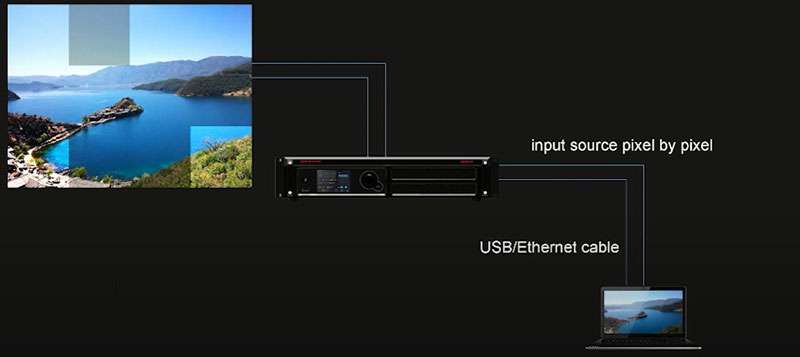
To begin with, let us see this picture.
If you have connected your LED screen with a control system, you may know the logistics – first, we will connect the screen with the LED control system; and second, we need a control computer to connect to the controller to provide signals.
As you can see, the example screen has the problem of an inconsistent display effect for some parts. And we can deal with it through appropriate and simple Novastar LED calibration, which we will discuss next.
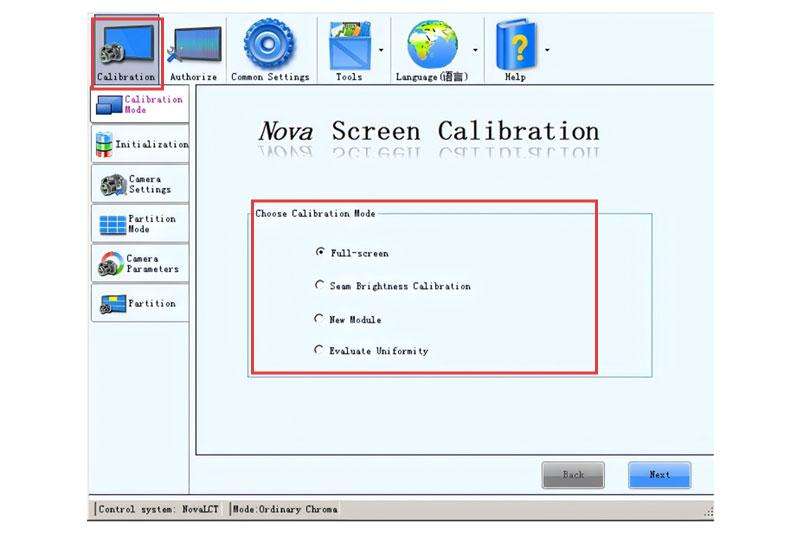
Now, we start from the calibration interface:

Just click “Calibration” to enter the setting interface.
Then, please choose “Adjust coefficients” to calibrate the LED display color.
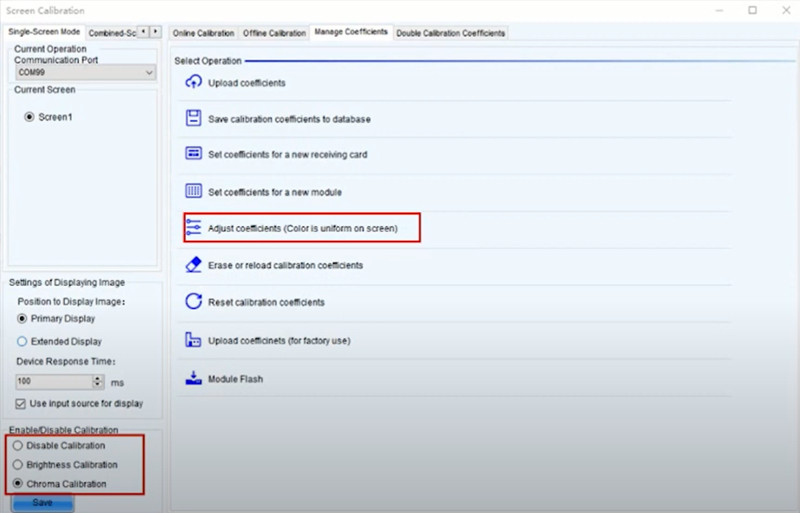
Novastar Calibration by LED Cabinet Level
You can choose different adjustment modes from “Pixel by pixel”, “Screen” and “Select by Topology”
In this case, we choose “Select by Topology.” It means you will adjust the coefficient by cabinet level.
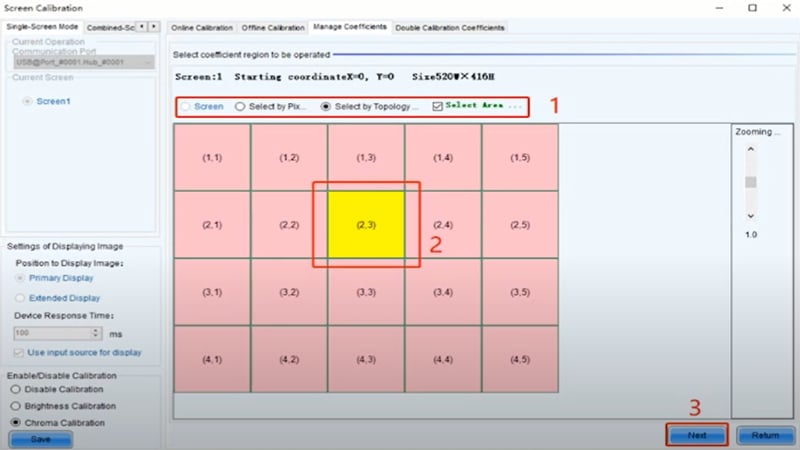
Then, click “Next” to adjust the area that you want.
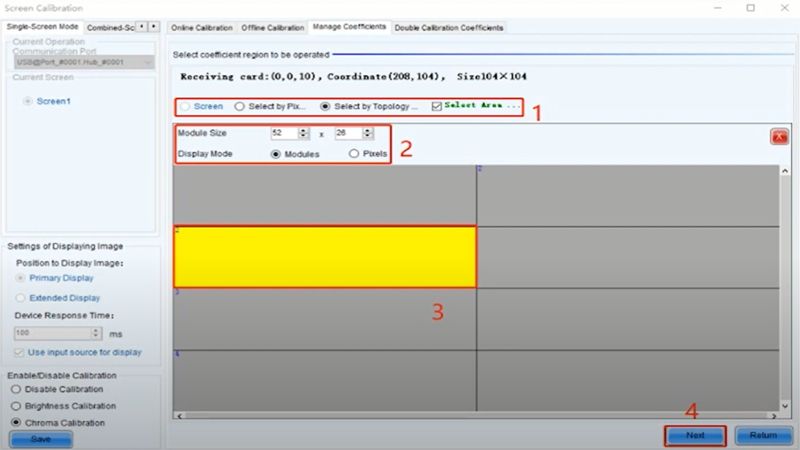
The picture is shown below meaning you can also choose the more accurate area that you want to adjust.
Here are two modes as step 2 shows: by pixels or by modules.
Here we choose to adjust by modules and fill in module size then. For step 3, you can select the area.
Next, there will show some values we can adjust. In simple adjustment mode, we can adjust values of red, blue, and green.
And in advanced adjustment mode, we can adjust more values as the picture shows.
Just choose from red, green and blue, you can adjust their values separately including brightness, saturation, and hue.
You can see the visual effect with your naked eye to adjust the effect until you are satisfied. I mean, when the color and brightness level of the adjusted area is uniform with other normal areas.
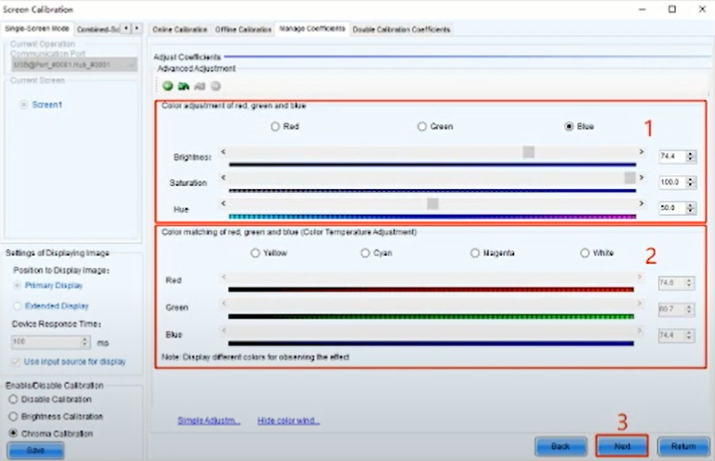
If you want to apply the effect to other areas of the screen, just click “Save”, and this step will save the coefficient in your receiving cards.
Then finish the following steps 2 to 4.
Finally, do not forget to click “Apply” to launch the coefficient effect to the rest area if you want.
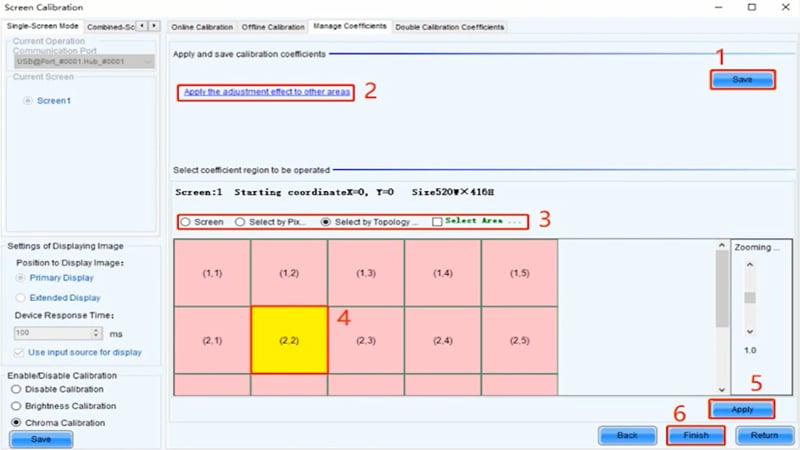
Now, you may have a question: what if I just want to adjust coefficient by modules?
Novastar LED Calibration by LED Module
The beginning is same, we click “Adjust Coefficient” to enter the right interface.
However, the difference is, this time we need to choose “Select by Pixel.”
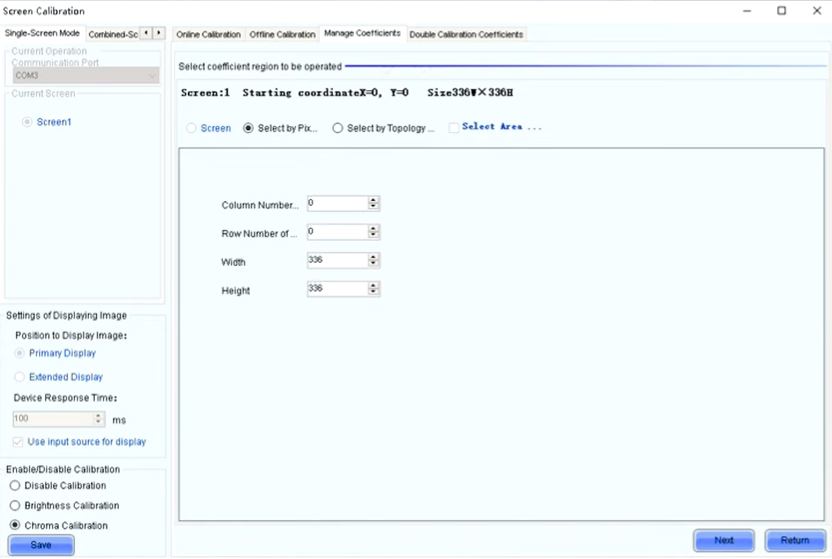
After that, you need to fill in correct numbers to position your targeted modules. If you are not clear, try to calculate it by your cabinet pixels, and the sequence number of the targeted LED display module.
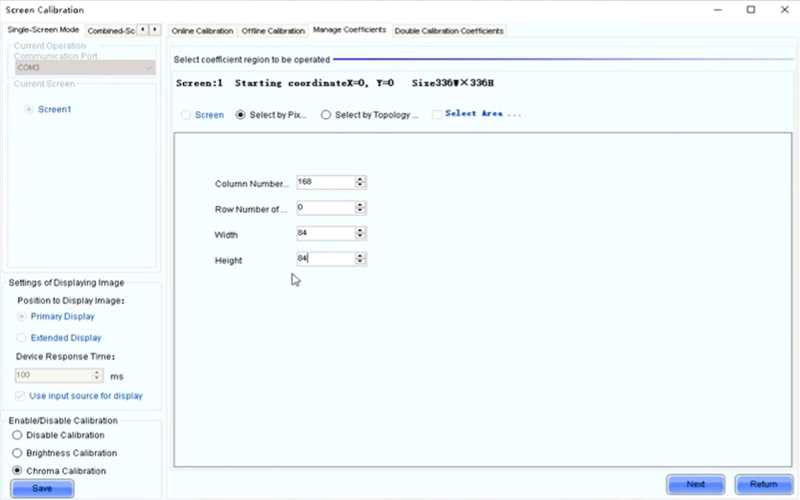
Click “Next” to turn to the next step, and the following process is just as the same with what we have listed above.
8. Advanced Calibration Techniques
Unlock unrivaled visual performance with advanced Novastar calibration techniques for LED displays. Designed for high-end event environments, control rooms, and fine-pitch installations, these powerful methods go beyond basic uniformity, targeting HDR support, ambient light compensation, and super-grayscale control under real-world conditions.
① HDR & Wide Color Gamut Calibration
Novastar supports HLG and HDR10 workflows aligned with BT.2100 and SMPTE ST 2084 standards. Leveraging its Image Booster and Nova control system, the calibration delivers precise PQ/HLG transfer curves, boosting contrast and dynamic detail while ensuring color fidelity across DCI‑P3 and Rec.2020 gamuts.
② Ambient Light Compensation & Thermal Correction
As ambient lighting or heat alters perceived brightness and color, Novastar integrates real‑time compensation algorithms. Thermal compensation dynamically adjusts calibration coefficients to counteract module edge reddening or center blue-green shifts, preserving uniformity in changing conditions.
③ Rapid & Flexible On-Site Calibration
For field deployments, Novastar enables ultra-rapid, full-screen pixel-level calibration, with up to 600,000 pixels in ~25 minutes. Technicians can calibrate replaced modules or curved surfaces swiftly to maintain seamless uniformity using closed-loop NovaCLB-Screen workflows.
These advanced calibration techniques ensure your LED deployments deliver breathtaking color depth, consistent low-grayscale performance, and adaptive brightness under varied lighting.
9. Novastar Calibration vs Uncalibrated Displays
When you choose an LED display, calibration isn’t just a feature; it’s the cornerstone of picture-perfect performance.
| Feature | Calibrated (with Novastar) | Uncalibrated |
| Brightness Uniformity | ≤ ±1% variance | > 10% common |
| Color Accuracy (ΔE) | ≤ 0.003 | Visible shifts |
| Seam Visibility | Invisible | Pronounced seams |
| Grayscale & Gamma | Smooth tonal transitions | Banding, bleaching |
| Image Consistency | Same across batches | Mismatched tiles |
| Module Lifespan | Extended | Shortened by overdrive |
In summary, LED walls is only as good as its weakest tile. With Novastar Calibration, you ensure visual faithfulness, long-term reliability, and premium brand perception. From broadcast studios to flagship store facades, calibration turns complex LED arrays into flawless visual canvases, something uncalibrated displays simply can’t match.
10. Real-World Case Studies
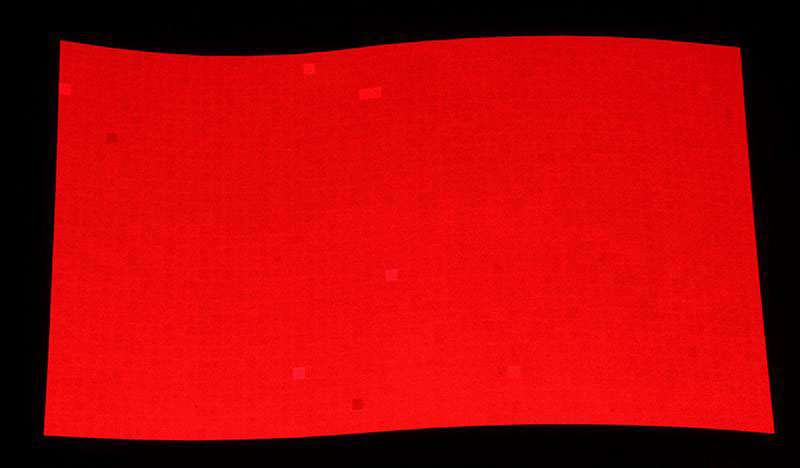
Case 1: Curved LED Screen Calibration
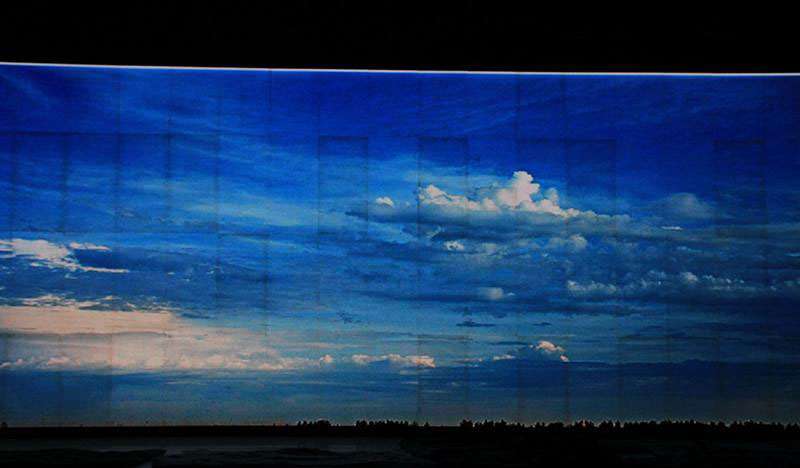
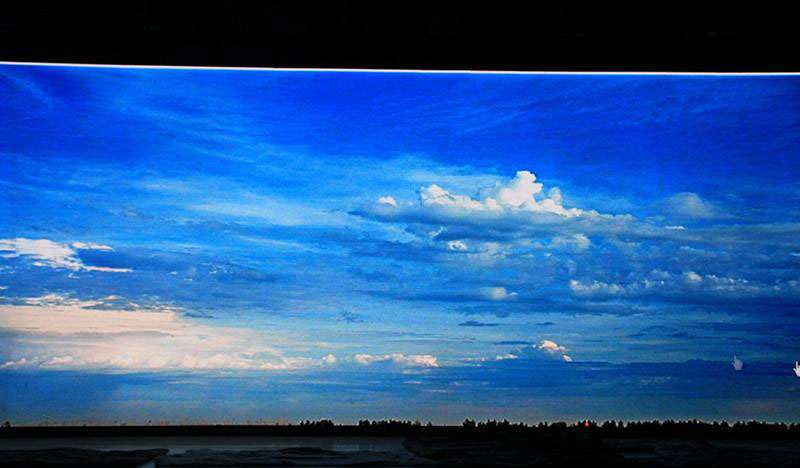
Case 2: LED Display Cabinet Calibration
11. Why Choose UNIT LED for Calibrated LED Display Solutions?
UNIT LED stands out as a trusted partner for precision-calibrated LED display solutions that meet the highest industry standards. Here’s why businesses worldwide rely on us:
Professional Calibration Expertise
We utilize industry-leading Novastar calibration systems to ensure perfect color uniformity, brightness consistency, and optimal grayscale performance across every LED module.
Premium-Grade LED Displays
UNIT LED displays are engineered with high-quality components and go through strict quality control and factory calibration. The result? Vivid, lifelike visuals with zero color deviation.
Turnkey Custom Solutions
From indoor fine-pitch to large-scale outdoor displays, we offer tailored calibration services that match your display size, resolution, and application.
Global Track Record
UNIT LED has successfully delivered calibrated LED screens to over 100 countries for applications in retail, sports arenas, control rooms, events, and more.
Dedicated Technical Support
Our experienced team provides expert guidance from pre-sales consulting to post-sales calibration assistance, ensuring your screen performs perfectly from day one.
Star Your Project Now
12. FAQs
It depends on usage. For critical applications, calibrate every 6-12 months. For retail or general displays, annually is recommended.
Novastar calibration tools are optimized for Novastar control systems. Cross-brand compatibility is limited.
Yes. New modules may not match existing ones in brightness and color.
Slightly, but it improves uniformity and overall image quality.
13. To Sum up
Novastar Calibration stands as a cornerstone for achieving professional-grade LED display performance. By combining precise hardware measurement, intelligent software compensation, and robust maintenance workflows, it addresses the industry’s most pressing challenges in uniformity and color fidelity.
Whether for rental staging, retail signage, broadcast backdrops, or control rooms, adopting Novastar Calibration elevates visual impact, operational efficiency, and long-term reliability.