LED Screen Dead Pixel: Causes, How to Fix & Prevention Guide
LED screen dead pixel is one of the most common quality issues in displays. Whether it’s a single black dot or a cluster of faulty pixels, these defects can significantly affect visual performance, especially in fine pixel pitch LED video walls.
In this guide, we’ll explain what dead pixels are, why they happen, and how to fix and prevent them in professional LED display systems.
Table of Contents
1. What Is Dead Pixel in LED Screen?
An LED screen dead pixel is a pixel that no longer emits light and appears as a permanent black dot on the screen. It usually occurs when the pixel fails to receive power or its internal components stop functioning.
In LED displays, each pixel consists of red, green, and blue LEDs. If all sub-pixels fail, the pixel becomes completely dark.
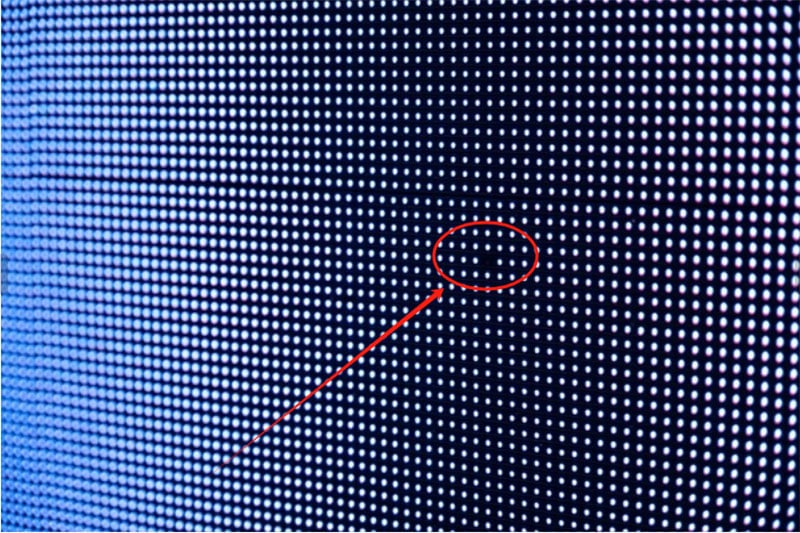
On an LED screen, dead pixels typically appear as one of the following:
- A permanently black (unlit) dot — the LED lamp bead is completely dead
- A constantly lit (bright white) dot — the LED is stuck in an always-on state
- A color-deviated dot — one or more of the RGB sub-channels has failed, resulting in an incorrect color
Even a single dead pixel matters. On fine-pitch LED displays, individual pixels are extremely small and densely packed. So any defect is clearly visible, especially in static content environments like control rooms, corporate lobbies, and broadcast studios.
2. Dead Pixel vs Stuck Pixel: What’s the Difference?
In LED displays, it’s important to distinguish between dead pixels and stuck pixels on screen, as they have different causes, symptoms, and solutions. Understanding the difference helps in maintenance, troubleshooting, and setting quality standards for your LED screens.
LED screen dead pixel is a pixel that does not emit any light and appears permanently black. A stuck pixel, on the other hand, is a pixel that is “stuck” on a specific color (red, green, or blue) and does not change as it should.
Here’s a clear comparison:
| Feature | Dead Pixel | Stuck Pixel |
| Appearance | Permanently black (no light) | Shows a constant color (red, green, or blue) |
| Cause | LED chip failure, soldering defect, thermal stress, moisture damage | Single sub-pixel failure, manufacturing defect, software/driver issue |
| Repairability | Usually cannot be fixed without hardware replacement | Sometimes recoverable with pixel-refresh software or gentle physical methods |
| Impact on Image | Noticeable black spot, more obvious in dark scenes | Color spot, less noticeable in complex images but distracting in uniform backgrounds |
| Frequency | Less common but permanent | More common, often isolated sub-pixels |
| Detection | Easy to identify on any screen content | May require solid color test to notice |
| Typical Solution | Replace LED module or screen | Pixel massage, software fix, or module replacement if persistent |
In a world, LED screen dead pixel is permanent failures, usually a hardware issue. And LED screen stuck pixel is often temporary or partial failures, sometimes recoverable. For high-end LED video walls, both types should be minimized to ensure visual quality.
3. Types of Dead Pixels in LED Displays
LED display dead pixels can vary in type and severity, affecting both image quality and viewer experience. Understanding the different types helps you identify issues more efficiently and determine the best corrective measures.
(1) Full Dead Pixel
A full LED screen dead pixel occurs when all sub-pixels (red, green, and blue) stop functioning. The result is a permanent black dot on the screen. Full dead pixels are usually caused by LED chip failure, soldering defects, or thermal stress.
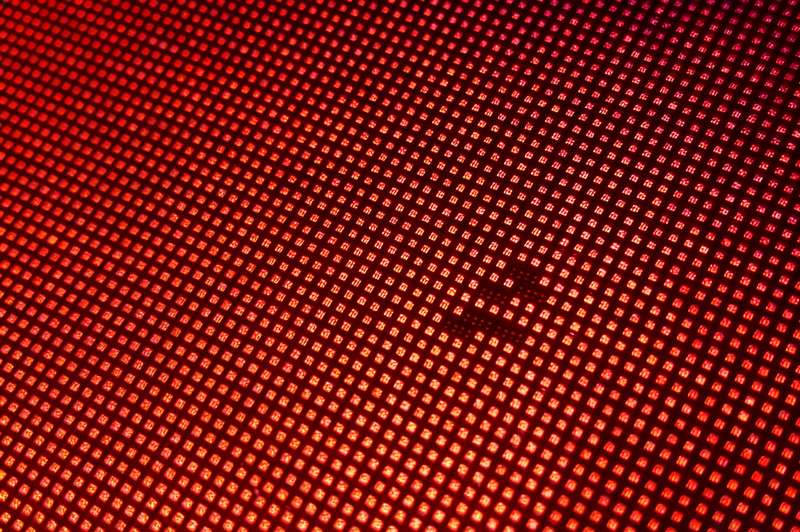
(2) Partial Dead Pixel
Partial LED dead pixels occur when one or two sub-pixels fail while the others remain functional. This results in the pixel displaying incorrect colors or appearing dimmer than surrounding pixels. Partial failures can often indicate early-stage hardware issues.
(3) Weak Pixel
Weak pixels emit light at a lower intensity than surrounding pixels, making them appear dim or faded. Aging LEDs, poor power distribution, or insufficient heat dissipation in high-resolution LED video walls commonly cause weak pixels.
(4) Stuck Pixel
Although not technically “dead,” a stuck pixel remains permanently lit in one color (red, green, or blue). It is often caused by manufacturing defects, software, or driver issues and can sometimes be restored using pixel-refresh techniques.
Regular testing and quality inspection can detect these types early. For professional LED solutions, using high-quality LED modules and proper thermal management can minimize dead pixel occurrences.
4. What Causes Dead Pixels on Screen?
Dead pixels don’t appear randomly. Dead pixels in LED screens are often the result of underlying hardware, environmental, or operational issues.
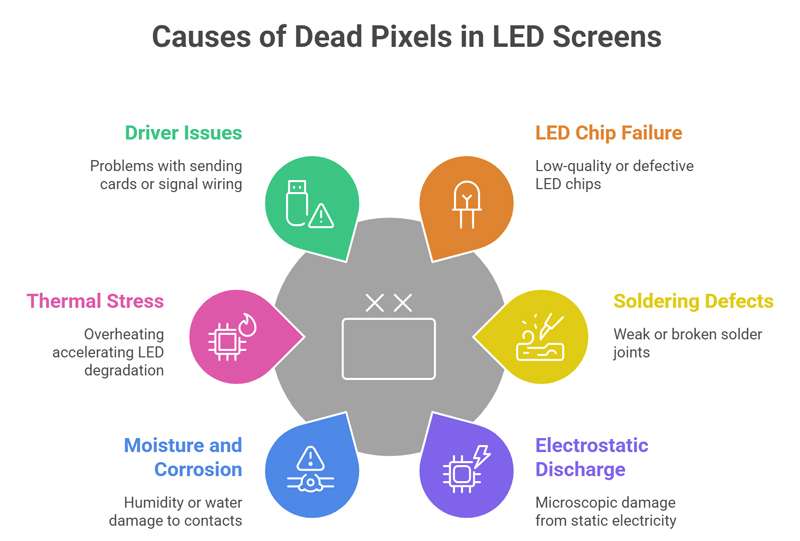
① LED Chip Failure
The LED chip is the core component of each pixel. Low-quality or poorly manufactured chips can fail prematurely, resulting in dead pixels. Even minor defects in chip packaging or internal wiring may cause individual pixels to stop emitting light.
Using high-reliability LED modules can significantly reduce the risk of chip failure.
② Soldering and Connection Defects
Weak or broken solder joints between the LED chip and PCB can interrupt electrical flow, causing pixels to fail. Thermal expansion, vibration during transport, or improper assembly can cause these defects.
Regular quality inspections and proper module handling are essential to minimize this risk.
③ Electrostatic Discharge (ESD)
Electrostatic discharge during manufacturing, installation, or maintenance can damage LED components at a microscopic level. ESD is a common cause of LED screen dead pixels and may not be immediately visible.
Applying ESD protection and handling with care during installation can prevent such damage.
④ Moisture and Corrosion
Humidity or water ingress can cause corrosion on the PCB or LED contacts, especially in outdoor or rental LED displays. Over time, this can interrupt current flow and result in LED display dead pixels.
Ensuring proper waterproofing, conformal coating, and IP-rated enclosures helps protect LEDs from moisture-related failures.
⑤ Thermal Stress and Overheating
Excessive heat accelerates LED degradation and can damage the driver IC or solder joints. Poor thermal management in high-density LED video walls increases the likelihood of dead pixels on screen.
Effective heat dissipation systems, such as aluminum cabinets and cooling fans, are critical for long-term reliability.
⑥ Driver or Signal Issues
Sometimes, dead pixels on screen are caused not by the LED itself but by issues in the sending card, driver IC, or signal wiring. Ensuring quality power supply and correct signal routing helps reduce pixel failure due to electronics.
LED screen dead pixel is rarely random. It is usually system-level reliability issues. Preventing dead pixels on screen requires a combination of high-quality components, proper thermal and moisture management, and careful handling during production and installation.
5. How to Identify Dead Pixels on Your LED Screen?
Identifying dead pixels on screen early is crucial for maintaining the visual quality of LED displays, whether for outdoor LED video walls, rental LED screens, or fine pixel pitch LED displays. Proper detection allows operators to take corrective measures before small issues impact viewer experience.
(1) Visual Inspection
The simplest method to detect LED screen dead pixel is by carefully inspecting the screen under normal and uniform lighting. Look for:
- Black spots indicating dead pixels
- Unchanging color dots, which may indicate stuck pixels
- Dim or weak pixels that appear faded compared to the surrounding areas
For large screens, it’s best to inspect multiple viewing angles and distances to identify subtle defects.
(2) Solid Color Test Patterns
Using solid color patterns (red, green, blue, white, and black) helps highlight problematic pixels. This method makes dead or stuck pixels stand out clearly against uniform backgrounds. Many LED control systems or video processors allow you to run these test patterns easily.
https://youtu.be/tjLDT8ZFZ0g?si=qUa1GWCh9h7Maovh
(3) Software-Based Pixel Test Tools
Professional LED maintenance software can scan the screen automatically and generate a dead/stuck pixel map. These tools help quantify pixel issues, providing accurate data for repair or replacement decisions.
(4) Check During Routine Maintenance
Regular inspection during scheduled maintenance ensures early detection. Outdoor LED displays, in particular, are prone to moisture, dust, and thermal stress, which can gradually lead to dead pixels.
Tips:
- Document detected pixels with photos for future reference.
- Compare readings over time to track whether weak or partial pixels are worsening.
- Combine visual inspection with automated tools for the best accuracy.
6. How to Fix Dead Pixels on LED Display?
Dead pixels on LED display can be frustrating, but identifying the root cause is key to selecting the right repair method. Depending on the type of LED display, outdoor LED walls or fine-pixel indoor displays, there are several effective approaches to fix or mitigate dead pixels.
Below are the most effective solutions used in the LED display industry:
Fix 1: Single LED Lamp Bead Replacement
For isolated dead pixels caused by individual LED failure, technicians can replace a single LED lamp bead using a hot air rework station. This method restores the pixel without replacing the entire module.
However, this process requires:
- Precision tools and skilled operators
- Matching LED specifications (brightness, wavelength, batch consistency)
- Careful temperature control during soldering
For fine pixel pitch LED displays (≤P1.2), this repair becomes extremely delicate. In such cases, it is recommended to have the repair handled by the manufacturer or a certified service provider to avoid further damage.
https://youtu.be/HGt0uaPaOC0?si=bHlahzlfdlOFIl1z
Fix 2: LED Module Replacement
When multiple dead pixels appear within the same area, or when individual repair is not cost-effective, replacing the entire LED module is the most practical solution.
Modern LED displays with front-service design allow quick module replacement without removing the cabinet, which:
- Reduces downtime
- Lowers labor costs
- Ensures consistent display performance
This method is widely used in rental LED displays and commercial LED video walls, where speed and reliability are critical.
Fix 3: Driver IC, Ribbon Cable, or Power Supply Check
Not all LED screen dead pixel issues are caused by LED failure. When pixels fail in rows, columns, or block patterns, the problem often lies in:
- Driver IC malfunction
- Loose or damaged ribbon cables
- Power supply instability
https://youtu.be/d1wBzpAWliA?si=UB7DpepdNn26s2zJhttps://youtu.be/PKYmBzw9Egk?si=nTtc8bR_bhcfqxUP
Before replacing LED components, it is essential to inspect and test these electronic parts. In many cases, replacing the driver IC at the module level can resolve the issue efficiently.
Fix 4. Temporary Cosmetic Fix
In situations where immediate repair is not possible and the defect is minor, some operators apply a temporary cosmetic solution. For example:
- Using a small black ink dot
- Applying optical filler to mask a bright or “hot” pixel
This approach can reduce visual distraction in the short term, especially for distant viewing applications. However, it does not fix the underlying hardware issue and should only be used as a temporary measure.
For long-term reliability, combining proper repair methods with regular LED screen maintenance and high-quality components is essential to minimize future dead pixel issues.
7. How to Prevent LED Screen Dead Pixel?
Preventing LED screen dead pixels is far more effective and cost-efficient than repairing them. Dead pixel prevention depends on a combination of high-quality components, proper design, and standardized maintenance practices.
The following practices significantly reduce the likelihood of dead pixels over the lifetime of your LED display:
(1) Use High-Quality LED Components
The foundation of a reliable LED display lies in the quality of its components. Choosing high-grade LED chips, driver ICs, and power supplies significantly reduces the risk of early pixel failure. Consistency in LED binning (brightness and wavelength) also ensures uniform performance across the entire screen.
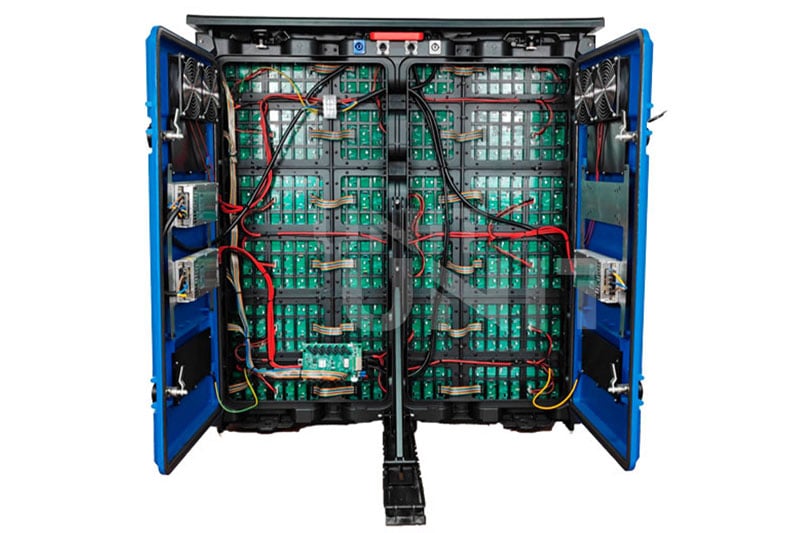
(2) Implement Strict Manufacturing and QC Processes
LED screen dead pixels often originate during production. Manufacturers should apply:
- Automated soldering and inspection systems
- Aging tests (burn-in) before shipment
- Pixel-by-pixel quality checks
These processes help detect and eliminate defective LEDs before installation.
(3) Optimize Thermal Management
Heat is one of the leading causes of LED degradation. Effective thermal design includes:
- Aluminum cabinets for better heat dissipation
- Proper ventilation or cooling systems
- Stable power distribution
Maintaining a lower operating temperature extends LED lifespan and reduces pixel failure rates, especially in high-density LED video walls.
(4) Protect Against Moisture and Environmental Factors
For outdoor LED displays, exposure to humidity, rain, and dust can lead to corrosion and electrical failure. Preventive measures include:
- Waterproof design (IP65 or higher)
- Conformal coating on PCBs
- Sealed cabinets and proper drainage systems
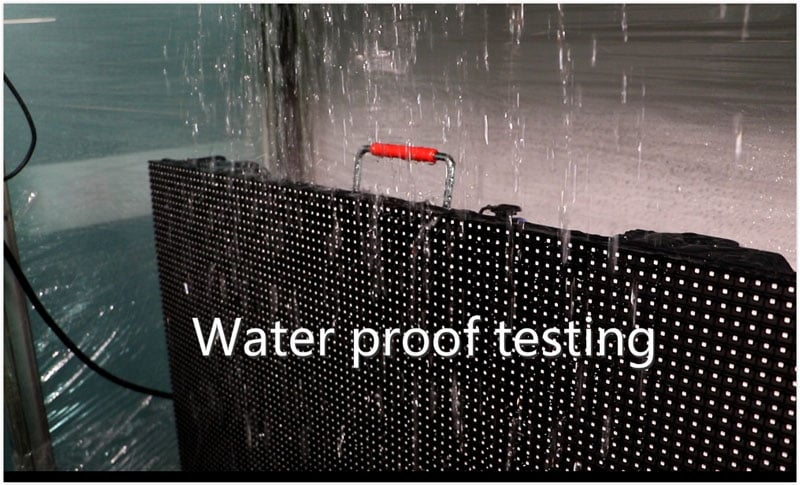
Environmental protection is critical for long-term stability.
(5) Apply ESD Protection and Proper Handling
Electrostatic discharge (ESD) can damage LED components during manufacturing, transportation, or installation. To prevent this:
- Use anti-static equipment and grounding systems
- Train technicians in proper handling procedures
- Avoid direct contact with sensitive components
(6) Perform Regular Maintenance and Inspection
Routine maintenance helps identify early-stage issues, such as weak or partial pixels before they become fully dead. Recommended practices include:
- Running periodic pixel tests
- Checking power and signal connections
- Cleaning dust and debris
For rental LED screens, frequent inspection is especially important due to repeated assembly and transport.
By combining these strategies, you can significantly reduce LED screen dead pixel rates and maintain consistent, high-quality visual performance over time.
8. Professional Solutions for LED Dead Pixel Issues
We understand that dead pixels are not just a cosmetic issue, they are a signal of quality, process control, and long-term reliability. Every LED display, UNIT LED manufacture undergoes:
- Full pixel-by-pixel inspection using automated optical inspection systems
- 72-hour factory aging burn-in test before shipment
- Strict incoming quality control for LED lamp beads (PPM-rated, from tier-1 suppliers)
- ESD-protected handling throughout the entire production and packaging process
- Documented dead pixel rate guarantee: ≤1 PPM at delivery
https://youtu.be/kmVq7XGiMSk?si=5bE6F8hndEJsH_s6
UNIT LED displays are engineered for front-service access, ensuring that in the rare event a pixel replacement is ever needed, it can be done in minutes, minimizing your operational downtime.
Whether you’re deploying a fine-pitch indoor LED wall, a large-format outdoor billboard, or a rental staging system, UNIT LED delivers the reliability you need to keep your display performing flawlessly.
9. Conclusion
LED screen dead pixel is a common challenge in LED displays, but understanding their causes, types, and preventive strategies can significantly reduce their impact.
By combining high-quality LED modules, optimized thermal and environmental design, strict quality control, and regular maintenance to maintain consistent, high-quality visuals.