How LED Display Work: A Complete Guide for Beginners
Today, let’s dive in and uncover the secrets of how LED display work.
LED screens have revolutionized the way we experience vision. But how do these high-tech screens work their magic?
In this article, we’ll explore the fascinating technology behind LED screens. From the way they create stunning colors to the LED control systems.
Whether you’re a tech enthusiast or someone who’s considering getting an LED screen for your business, this ultimate guide about how LED does displays work will be helpful. Understanding how LED displays work will give you a new appreciation for their capabilities.
Table of Contents
Quick Answer: How Does an LED Display Work?
An LED display works like a large digital grid. A video source sends content to the LED controller. The controller processes the signal and sends data to receiving cards inside the LED cabinets. Then the receiving cards control the red, green, and blue LEDs on each module, so the full screen can show images and videos.
1. What is an LED Display?
Before learning how LED display works, let’s explore what LED display is first.
An LED display is a flat screen that uses light-emitting diodes (LEDs) as the main technology to create visual effects. Unlike traditional displays that rely on backlights (such as LCDs), LEDs can emit light on their own. Brightness, energy efficiency, and color accuracy are all higher.
Learn more about the difference between LCD and LED.
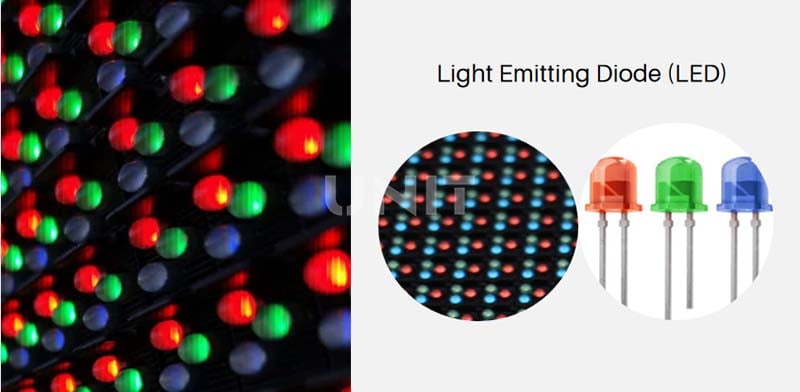
LED display panel is widely used in digital LED billboards, video walls, sports LED screen, and other fields.
According to the prominent characteristics of screen imaging, we can simply divide LED displays into the following two categories:
(1) Monochrome LED display
Monochrome LED displays use monochrome LEDs (red or green) to display simple text or graphic content.
(2) Bicolor LED display
Bicolor LED displays are composed of two colors of LEDs, usually red and green.
(3) RGB LED display
Full-color LED displays combine red, green, and blue LEDs to produce millions of colors.
Therefore, it can achieve more vivid visual effects. This is also the most widely used display on the market.
https://youtu.be/qJadnjZtpK8
RGB full-color LED display aging test
LED technology allows modular design and scalability.
It has become the first choice for advertising, entertainment, and information dissemination due to its excellent performance in indoor and outdoor environments.
1.1 The 4-Step Working Process of an LED Display
From content input to final image output, an LED display usually works through four main steps: video source, LED controller, receiving card, and LED module.
- Video source sends content: A computer, media player, camera, video processor, or media server sends images or video content to the LED control system.
- LED controller processes the signal: The LED controller decodes the signal, adjusts the resolution, and divides the image data for different screen areas.
- Receiving cards distribute data: Receiving cards inside the LED cabinets receive the processed data and send pixel-level instructions to the LED modules.
- RGB LEDs create the image: Each red, green, and blue LED adjusts its brightness. Together, millions of LEDs form the final image on the LED display.
Suggested image: Add a simple signal-flow diagram here: Video Source → LED Controller → Receiving Card → LED Module → Full LED Display.
2. Key Components of an LED Display
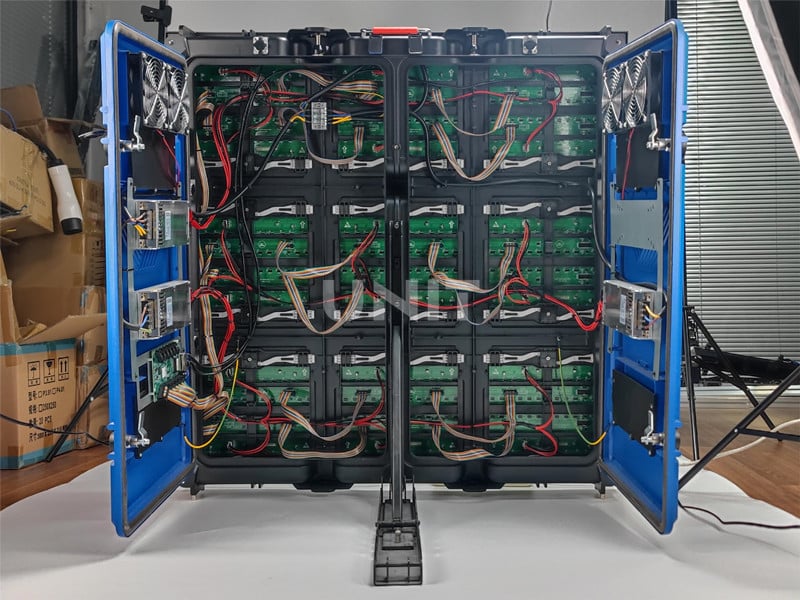
To understand how LED display work, it is important to understand the core components of LED screen cabinet:
(1) LED Modules
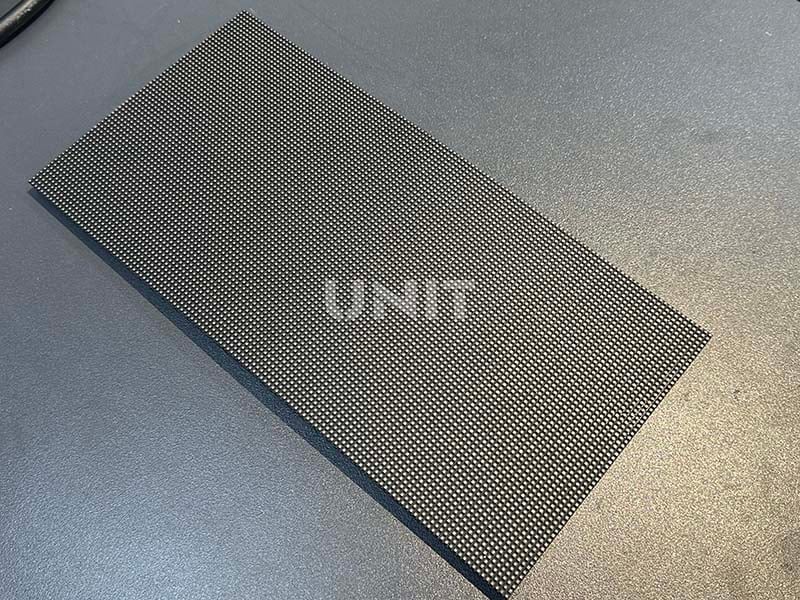
These are the building blocks of LED displays and consist of individual LEDs mounted on a circuit board.
The modules are arranged to form the screen and are responsible for light emission and color.
There are some different tpyes of LED modules: DIP, SMD, GOB, COB and more.
(2) Control System
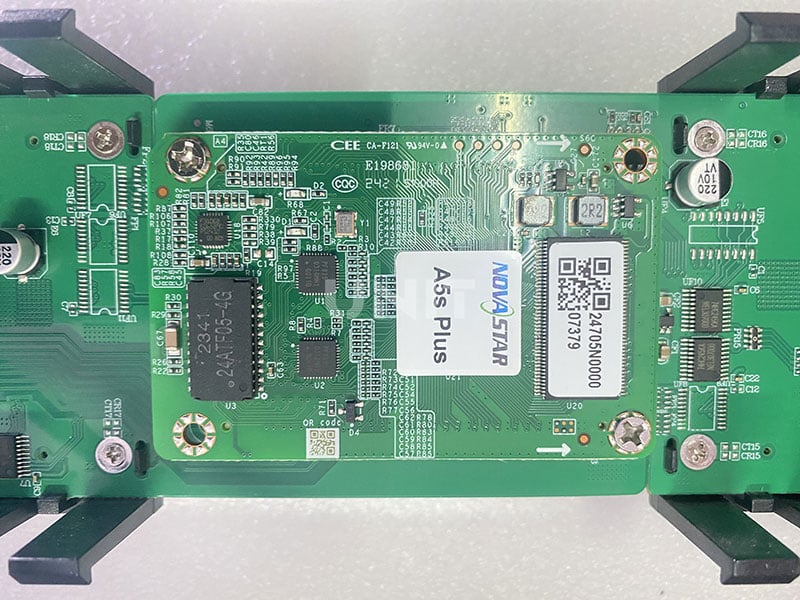
The control card (also called a controller or driver card) is one of the most important components in an LED display.
It acts as the brain of the system, processing and managing the signals that control how the display operates.
The control card communicates between the content source and the LED modules, ensuring that the right visual content is displayed at the right time.
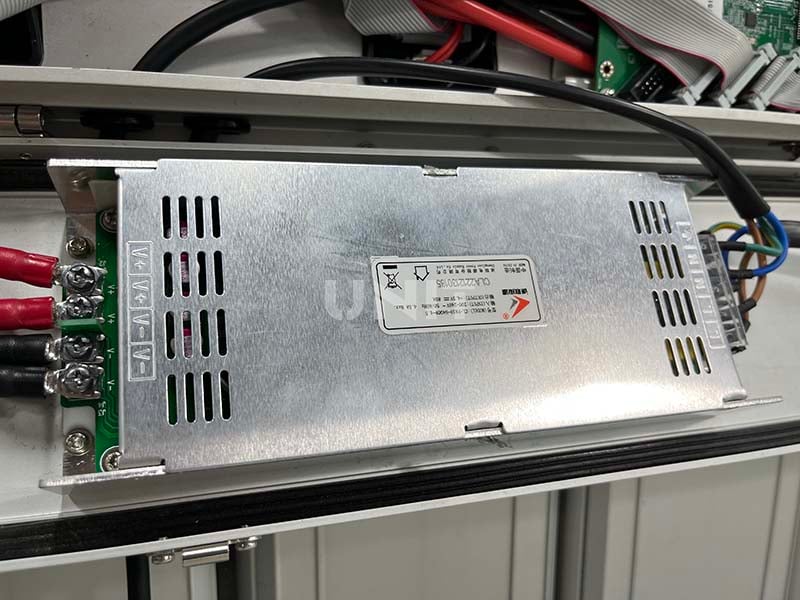
(3) Power Supply
The power supply ensures that the LED module receives consistent and stable voltage and current, which is critical to maintaining the brightness and color accuracy of the display.
Without a stable power supply, the LED display will not function properly.
It may cause problems such as flickering, uneven brightness, and even failure.
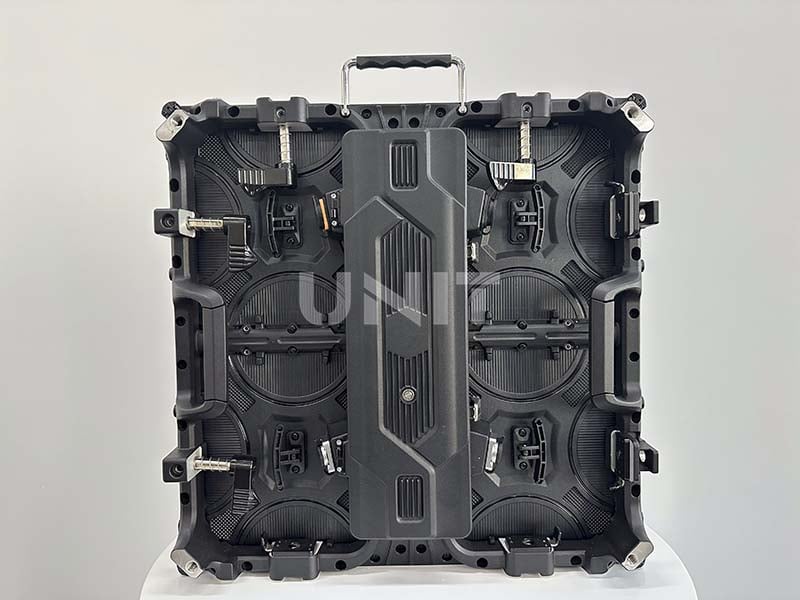
(4) Cabinet or Frame
The cabinet or frame is the structural enclosure that houses the individual LED modules, control system, power supply, and wiring.
The cabinet is the backbone of the LED display, providing physical protection and ensuring that all components are firmly in place.
It plays a vital role in the durability, stability, and flexibility of the display system.
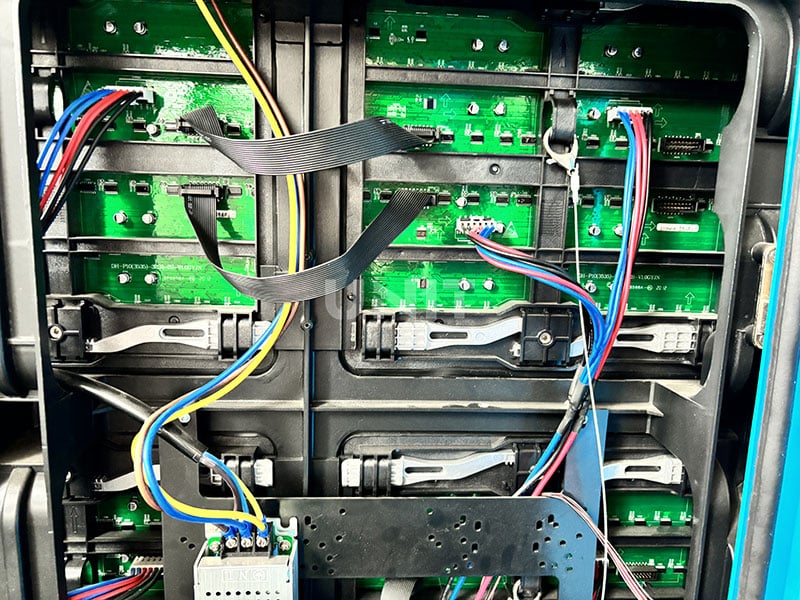
(5) Data Cables
The data cables carry digital signals from the control system to the LED modules.
These signals determine the color, brightness, and timing of each pixel.
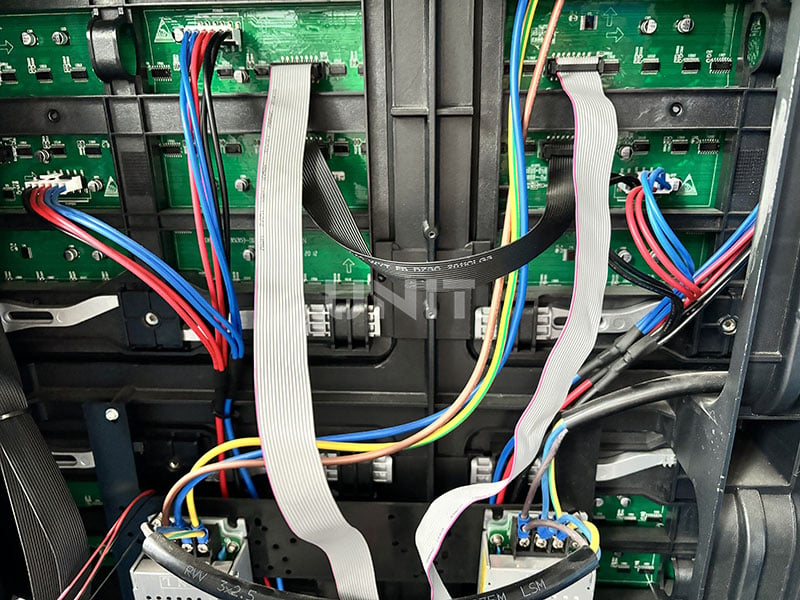
(6) Power Cables
The power cables provide the necessary power to the LED display, including the LEDs and other components, such as the control system and cooling system.
Proper voltage and current are critical to ensure that the display operates at optimal performance without damage.
These components work together seamlessly to deliver high-quality visuals, making LED displays reliable and versatile in a variety of environments.
3. Components of the Display System
Above, we have learned about the components of the LED display cabinet. However, it is not enough to fully understand how LED display work. Therefore, we need to understand the display system of the LED display.
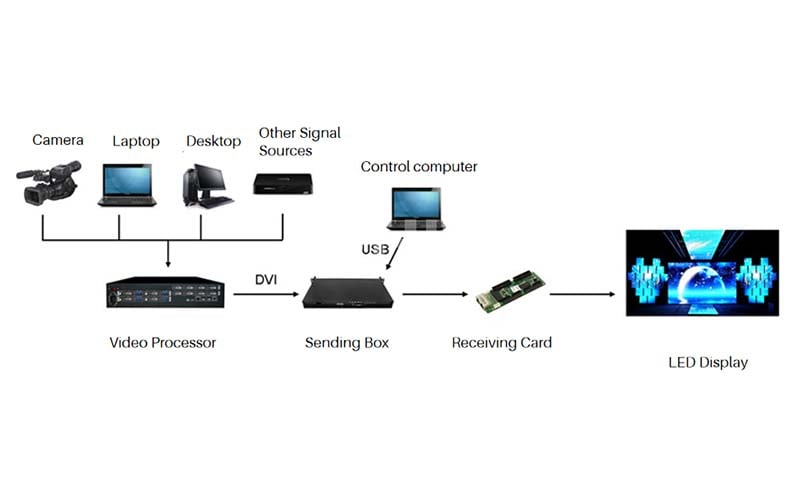
The LED display system is composed of computer-specific equipment, a display screen, a video input port, and system software.
(1) Computer and Special Equipment
Computers and special equipment directly determine the function of the system.
Different types can be selected according to the different requirements of the user for the system.
(2) Display Screen
The control circuit of the display receives the display signal from the computer.
It drives the LED to emit light to produce the picture and outputs the sound by adding a power amplifier and speakers.
(3) Video Input Port
It provides a video input port, the signal source can be a video recorder, DVD player, camera, etc., and supports multiple formats such as NTSC, PAL, S Video, etc.
(4) System Software
Provides software for LED display debugging function or the program playback function. For example, NovaLCT, LED MPlayer, etc.
How LED Display Works
4. Understanding the Working Principle of LED Displays
LED screens use light-emitting diodes (LEDs) to produce visual content through a combination of digital signals, color mixing, and precise control of each pixel.
Here’s a breakdown of how it works, along with basic technical terms you should know:
4.1 Important technical terms to know
(1) Pixel Pitch
Pixel pitch refers to the distance between the centers of two adjacent pixels, usually measured in millimeters (mm).
The smaller the pixel pitch, the closer the pixels are, the higher the resolution, and the clearer the image quality.
For example, a pixel pitch of 1.5mm means a high-resolution screen that is ideal for close viewing.
Whereas a larger pixel pitch, such as 6mm, might be used for outdoor billboards where viewers are typically farther away.
(2) Pixel Density
Pixel density measures the total number of pixels per unit area (usually pixels per square meter or pixels per inch).
A higher pixel density means more pixels are packed into a given space, resulting in clearer images and sharper text.
This is especially important in applications that require high-definition visuals, such as video walls or digital signage.
(3) LED Scan Rate
LED scan rate refers to how often an LED screen refreshes or scans its pixels to update the image.
A higher scan rate ensures smoother visuals, especially with fast-moving images or videos.
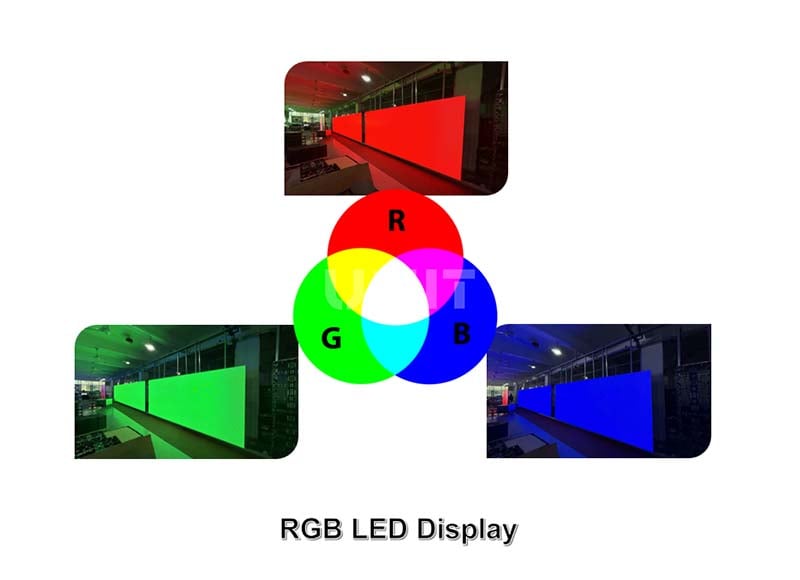
(4) RGB (Red, Green, Blue)
RGB is the color model that LED screens use to create a full spectrum of colors.
Each pixel on the screen is made up of red, green, and blue LEDs. By varying the intensity of each color, the display can mix millions of different colors.
This additive color model is fundamental to the functionality of LED displays, enabling them to display vivid, lifelike images and videos.
4.2 LED Control System
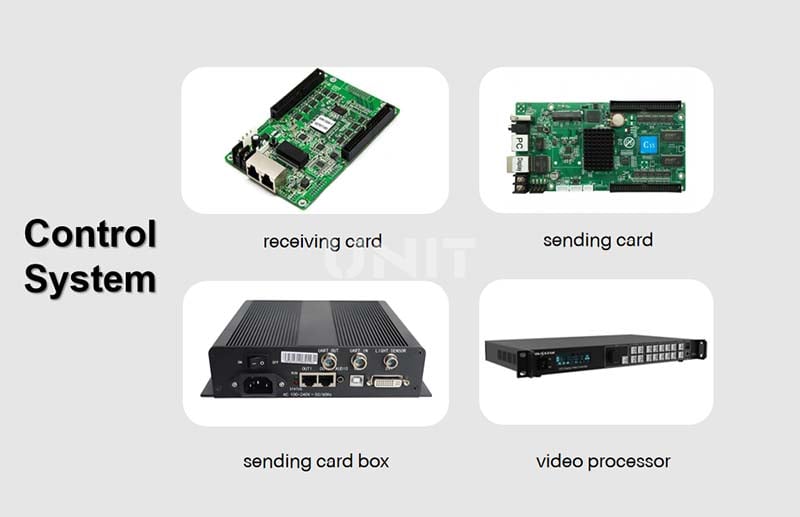
The LED control system acts as the brain of the LED display, controlling the operation of the entire system.
It processes input signals (such as video or image data) and converts them into digital signals that control the LEDs.
Here’s how it works:
(1) Signal Processing
The control system receives video, image, or text input from an external source (such as a computer, media player, or video server) and processes this data.
It decodes the video signal and prepares it for display on the LED screen.
(2) Control Cards and Processing Units
These devices receive processed data from the control system and send it to specific LED modules.
Each module has a corresponding controller that manages the signals for its pixels.
(2) Synchronization
The control system synchronizes the modules, ensuring that they display the same content at the same time without any visual differences.
(4) Brightness and Color Control
The control system can also adjust the LED screen brightness and color settings of individual pixels.
This optimizes visibility, contrast, and color accuracy in different lighting conditions.
(5) Remote Control and Software Interfaces
Many modern LED displays are remotely controlled via software.
The software allows users to upload content, schedule displays, and manage settings from a computer or mobile device.
It also makes troubleshooting and monitoring the display much easier, providing real-time diagnostics and performance metrics.
4.3 LED Displays Work Process
LED light array: After the LED lamp beads are packaged, they are arranged on the PCB (Printed Circuit Board) fixedly.
LED module: A unit composed of LED lamp beads and peripheral driving circuits.
LED cabinet: A unit formed by the regular combination of multiple LED modules plus a receiving card and a power supply.
LED display: A whole formed by the arrangement and combination of multiple LED cabinets.
At this time, the LED display cannot be lit up to display valid content. A dedicated controller and video source are required to light up the screen.
The source of the video source can be a computer, player, media server, camera, and other equipment.
4.4 How LED Display Work? 4 Steps!
Below is a diagram of how LED display work:
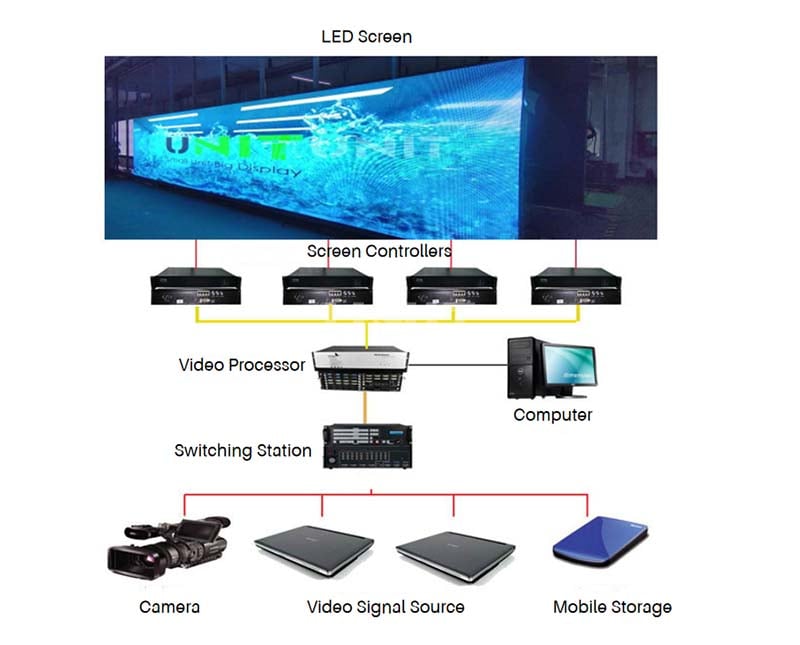
First, this equipment outputs the video source to the LED controller.
Then, the LED controller decodes the video source, converts the format, and cuts the image.
Next, it outputs the final data format suitable for the LED display to the receiving card in the LED cabinet.
Finally, the receiving card controls the brightness and color of the LED light-emitting chip, so that the required content is displayed on the LED display.
4.5 Refresh Rate, Scan Rate, and Brightness: Why They Matter
The working principle of an LED display is not only about lighting up LEDs. For real projects, refresh rate, scan rate, brightness, and power stability can strongly affect the final viewing experience.
- Refresh rate: A higher refresh rate makes video smoother and helps reduce flicker when the LED screen is recorded by cameras.
- Scan rate: Scan rate affects how the LED driver updates different rows or sections of pixels. It can influence brightness, stability, and camera performance.
- Brightness: Outdoor LED displays need higher brightness to stay visible under sunlight, while indoor fine-pitch LED screens need better low-brightness color performance.
- Power stability: A stable power supply helps avoid flickering, color inconsistency, overheating, and long-term failure.
5. How LED Screens Display Colors?
Above we have introduced the basic principles of how LED display works.
Next, we will reveal why full-color LED display can display images with such rich colors.
LED screens use the RGB (red, green, blue) color model to display colors. Each pixel is made up of tiny red, green, and blue LEDs.
By adjusting the intensity of these three colors, a wide range of colors can be created. Here’s how this process works:
5.1 RGB Color Model
Each pixel is typically made up of three LEDs – one red, one green, and one blue.
The RGB model is based on additive color mixing, where colors are combined to create new colors.
By increasing or decreasing the intensity of the red, green, and blue components, a pixel can display any color within the visible spectrum.
Red + Green = Yellow
Red + Blue = Magenta
Green + Blue = Cyan
Red + Green + Blue = White (when combined at full intensity)
5.2 Color Depth and Resolution
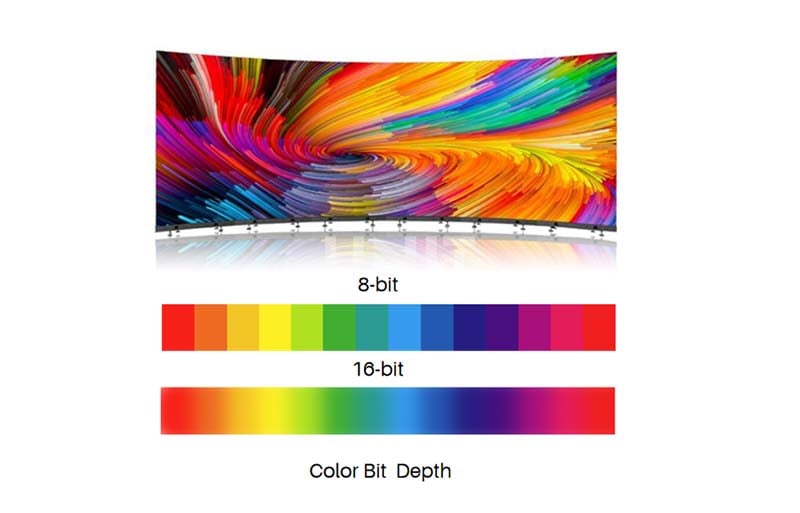
Color depth refers to how many shades of each color can be displayed.
A typical LED screen uses 8-bit color depth per channel (RGB), allowing for 256 levels of each color.
This adds up to over 16 million possible color combinations (256 x 256 x 256 = 16,777,216).
The resolution (pixels per inch) of an LED screen directly affects how those colors appear.
Higher resolution means more pixels are packed into the same space, resulting in a sharper, more detailed image.
6. The Technology Behind LED Display Screen
LED display technology has made significant advances, leveraging innovations to deliver superior image quality, energy efficiency, and durability.
Here are the key technologies that power modern LED screens:
6.1 LED Types
Different types of LED technology are used in displays, each with unique advantages:
(1) OLED (Organic Light Emitting Diode)
OLED screens are made of organic compounds that emit light when an electric current is passed through them.
Unlike traditional LEDs that require a backlight, OLED panels emit light directly from the pixels themselves, resulting in true black levels and better contrast.
(2) MicroLED
MicroLED is similar to OLED in that each pixel emits light.
But it uses inorganic materials, which makes it more durable and less prone to burn-in.
MicroLED screens are very bright with high resolution, high color accuracy, and a long lifespan.
(2) Full-color LED (RGB LED)
This is the most common type for large outdoor displays and video walls.
Full-color LED displays use red, green, and blue LEDs arranged in a matrix to create vivid, high-definition visuals.
The technology is modular, allowing these screens to be scaled to any size, from small panels to large billboards.
6.2 Pixel Matrix and Modular Design
Most LED displays are typically designed using a modular approach, where individual LED modules are combined to create a large screen.
Each module is a grid of LEDs, and the number of LEDs in each module determines the resolution of the screen.
This modularity allows for easy customization and repair, as individual modules can be replaced without affecting the entire display.
6.3 Dynamic Range and Brightness Control
(1) High Dynamic Range (HDR)
HDR technology allows for deeper contrast and more vivid colors.
By increasing the range of brightness between the darkest and brightest areas of an image, HDR can enhance the viewing experience and make visuals appear more realistic.
(2) Automatic Brightness Control
Modern LED panels often contain sensors that automatically adjust brightness levels based on ambient light.
This feature helps optimize viewing conditions, especially for outdoor displays exposed to changing sunlight.
(2) Full-color LED (RGB LED)
This is the most common type for large outdoor displays and video walls.
Full-color LED walls use red, green, and blue LEDs arranged in a matrix to create vivid, high-definition visuals.
The technology is modular, allowing these screens to be scaled to any size, from small panels to large billboards.
(2) Energy Efficiency and Durability
LED technology is known for its energy efficiency compared to traditional display technologies.
LEDs consume less power while providing higher brightness and longer lifespan.
This makes LED screen video more cost-effective in the long term, especially for large displays that operate for long periods.
7. FAQ
1) What is an LED display and how does it work?
An LED display is a screen that uses light-emitting diodes (LEDs) to produce images and videos.
These LEDs are arranged in a grid and emit light when an electric current passes through them.
Unlike traditional screens, LED displays are self-illuminating, meaning they do not require a backlight.
This allows for brighter visuals, higher contrast, and energy efficiency.
2) What are the main components of an LED display?
An LED display consists of several key components:
LED Modules – Contain multiple LEDs arranged in pixels to form images.
Control System – Includes sending and receiving cards that process video signals.
Power Supply – Converts electricity to the correct voltage for the LED modules.
Cabinet/Frame – Houses and protects the LED components.
Cooling System – Ensures efficient heat dissipation for long-lasting performance.
3) How is an LED display different from an LCD display?
|
Feature |
LED Display |
LCD Display |
|
Technology |
Uses self-emitting LEDs |
Uses liquid crystals with a backlight |
|
Brightness |
Higher, visible in sunlight |
Lower, less visible outdoors |
|
Energy Efficiency |
Consumes less power |
Requires more power due to backlight |
|
Contrast Ratio |
Higher contrast, deeper blacks |
Lower contrast due to backlight bleed |
|
Flexibility |
Can be curved or transparent |
Typically flat and rigid |
|
Lifespan |
Longer (up to 100,000 hours) |
Shorter (typically 50,000 hours) |
4) What are the benefits of LED display technology?
LED displays offer several advantages:
High Brightness & Visibility – Ideal for both indoor and outdoor environments.
Energy Efficiency – Consumes less power compared to LCD and traditional displays.
Long Lifespan – Can last up to 100,000 hours, reducing maintenance costs.
Superior Image Quality – Delivers vivid colors, deep contrast, and smooth visuals.
Versatility – Available in flexible, transparent, and curved designs.
5) How long does an LED display last?
A well-maintained LED display typically lasts 80,000 to 100,000 hours (8-10 years), depending on usage and environmental conditions.
Factors like heat dissipation, power quality, and proper maintenance can extend its lifespan.
Regular cleaning and avoiding excessive brightness levels also help improve longevity.
6) What controls an LED display?
An LED display is usually controlled by a sending card, receiving cards, control software, and sometimes a video processor. These parts process the video signal and send pixel-level data to the LED modules.
8. Conclusion
As LED screens advance, we can expect more innovations in color accuracy, resolution, and functionality.
Now that you understand how LED display work, are you ready to experience the future of displays? The power of LED technology is in your hands.
Looking for high-quality LED displays? Contact us today for a free consultation!
Related Posts
wp:paragraph
/wp:paragraph