Troubleshooting LED COB Display Issues & How to Repair
(Chip-on-Board) COB display is known for its seamless visuals, durability, and compact design. However, like any advanced technology, they can face issues over time.
Whether you’re noticing dead pixels, brightness inconsistency, or distorted images, understanding the causes and solutions is key to keeping your COB LED screen performing at its best.
In this article, we’ll walk through the most common COB LED displays problems, explain how to fix them, and provide a complete guide for everyday usage and long-term maintenance.
Table of Contents
Common COB LED Display Problems and Fixes
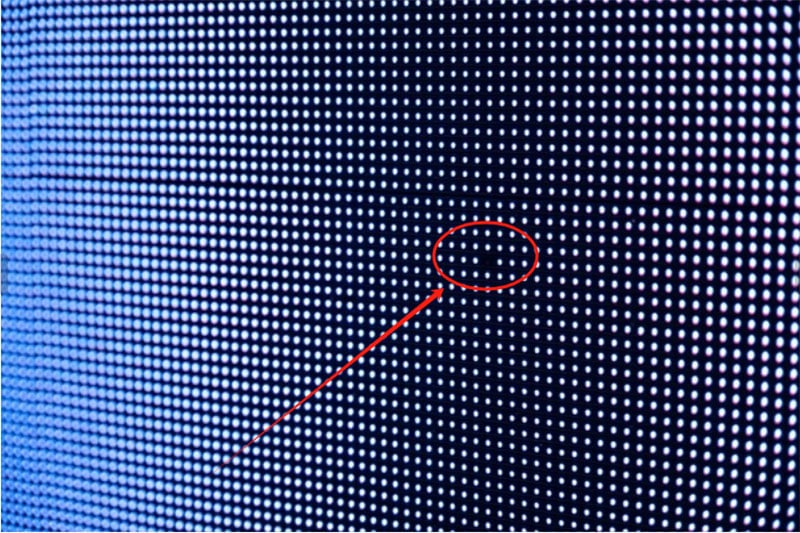
Dead Pixels on the COB Display
Cause:
Dead pixels often result from defects in the LED chip itself or during production stages such as die bonding or wire bonding.
External factors like power surges, overheating, or humidity can also cause pixel failure over time.
Fix:
During Warranty: If the dead pixels appear while still under warranty, contact the manufacturer for a module replacement or repair.
After Installation: For a small number of dead pixels, software-based pixel compensation can be used to balance brightness and color, minimizing visual disruption.
For Severe Issues: If multiple dead pixels occur, professional service may be required to locate and replace the damaged module or chips.
Uneven Brightness Across the Screen
Cause:
Uneven brightness is typically due to inconsistent drive currents across different LED modules.
Over time, the driver ICs may experience performance shifts, affecting power distribution.
Additionally, mismatched LED chips with varying brightness levels can also create uneven visuals.
Fix:
Use the brightness calibration function in the display’s control system.
Professional calibration tools can measure regional brightness and help adjust current output for uniformity.
If calibration doesn’t fix the issue, replace poorly matched modules with ones that offer better brightness consistency.
Screen Artifacts or “Garbled” Display (Color or Pixel Distortion)
Cause:
This is usually linked to signal transmission faults or control system errors.
Loose or damaged cables, electromagnetic interference, or outdated software can all disrupt signal flow, leading to visual glitches or distorted images.
Fix:
Check signal cables: Ensure they are securely connected and free from damage. Reconnect to eliminate loose contacts.
Replace shielding cables if electromagnetic interference is suspected.
Software reset: Reboot the controller or restore default settings.
Software compatibility check: Make sure the control system firmware is updated and compatible with the screen hardware.
Contact the LED display supplier for technical support if necessary.
https://youtu.be/_-2dkXX85vg
COB LED Display Screen is Black
Cause:
The black screen is generally caused by power supply and signal problems.
Fix:
Check whether the power supply is normal, make sure the power cord is connected normally, and the power switch is turned on.
Also check the signal line connection: Confirm that the sending card, receiving card and signal line are connected correctly. You can try to restart the device, restart the sending card and receiving card.
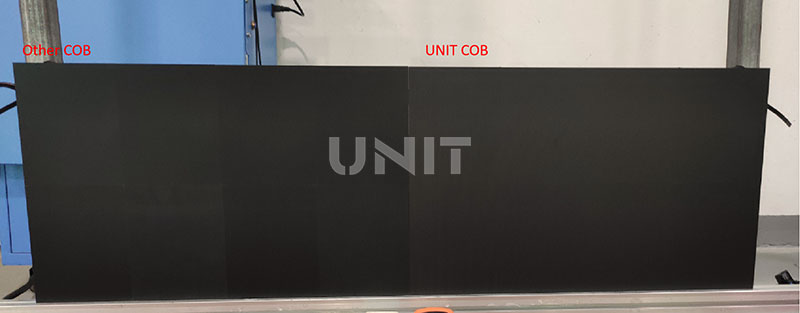
Color Blocks and Shadows Appear on the COB Display
Cause:
The screen brightness is uneven, and the brightness of some areas is significantly higher or lower than other parts. In severe cases, obvious bright spots or dark spots are formed.
COB packaging technology is difficult, and the technology development of various manufacturers is uneven. It is also because it cannot mix lights, split light and color differences, and the accuracy and manufacturing accuracy of materials such as chips, which cause problems such as uneven brightness and color within the module, color difference between modules, high and low brightness display effects and inconsistent correction effects.
Fix:
First check the signal source to confirm whether the video signal source is normal, and the signal source can be replaced.
Also check the network cable connection to ensure that the network cable connection between the sending card and the receiving card is stable.
Confirm that the display parameters are adjusted under normal conditions: Adjust parameters such as brightness, contrast, and color temperature to optimize the display effect.
If the problem is still not solved, try to calibrate the screen.
Video Playback Freezes
(1) Check the video format. It is recommended to use the MP4 format encoded with H.264 to ensure smooth playback.
(2) Upgrade the playback device. It is recommended to use a professional player or a high-performance computer.
(3) Check whether the cable is damaged and optimize the network environment. For video content transmitted over the network, it is recommended to use a wired network connection to ensure transmission stability.
(4) Low resolution or frame rate. If the video file is too large, the resolution or frame rate can be appropriately reduced to improve playback smoothness.
Single or Multiple Points are Abnormally Lit or Flickering
The core of the full flip-chip COB display is the LED chip itself.
If the chip quality does not meet the standard or the packaging material has defects (such as bubbles or cracks), it is very easy to cause the lamp bead to fail.
Especially in a high temperature environment, the thermal expansion mismatch of the packaging material will aggravate the chip damage, which is manifested as insufficient brightness or direct loss of light.
Possible causes of this phenomenon:
(1) Broken wire or solder joint detachment
Flip-chip technology relies on small-area connection points.
Once the solder joints are damaged during transportation, installation or vibration, the current supply will be interrupted, resulting in a single lamp or some lamps not lighting up.
(2) Driver IC failure
The driver IC is an important component for controlling the working state of the LED.
A failed IC may cause the corresponding area to fail to light up normally or to flicker or have abnormal colors. Damage to the driver IC is generally related to overload current, electrostatic discharge or abnormal working environment.
(3) Signal transmission problem
The signal link of the full flip-chip COB display is complex.
If the data line interface has poor contact, the cable is damaged or the control card fails, it is easy to cause image loss, screen distortion or refresh abnormality.
COB Display Usage and Maintenance Tips
To keep your display running smoothly and prolong its life, follow these key guidelines.
Best Practices for Day-to-Day Use
Power Supply Management
Always use a stable and regulated power supply. Avoid frequently turning the display on and off, as sudden power surges can damage internal components.
Best Practice:
Turn on the display 10–15 minutes before actual use to allow it to preheat.
After usage, allow the system to cool down before switching it off.
Ensure the voltage meets the manufacturer’s recommended input level.
Environmental Conditions
Both temperature and humidity significantly impact COB display performance and longevity.
Ideal Operating Conditions:
Temperature: 20°C – 35°C
Humidity: 40% – 60%
High temperatures can accelerate chip aging, while high humidity may lead to oxidation, short circuits, or corrosion.
Solutions:
Use air conditioners or cooling fans in hot environments.
Use dehumidifiers in humid areas.
Always install the display in a well-ventilated location.
Signal Input Compatibility
Connecting incompatible signal sources may cause display stretching, flickering, or blurry output.
How to Avoid This:
Match the input resolution and refresh rate to the LED COB display’s optimal settings.
Always check your user manual for the best display parameters.
Use high-quality signal cables, especially for long-distance connections.
Regular Maintenance Checklist for COB LED Screens
Preventive maintenance not only ensures better performance but also reduces long-term repair costs.
Here’s a routine checklist:
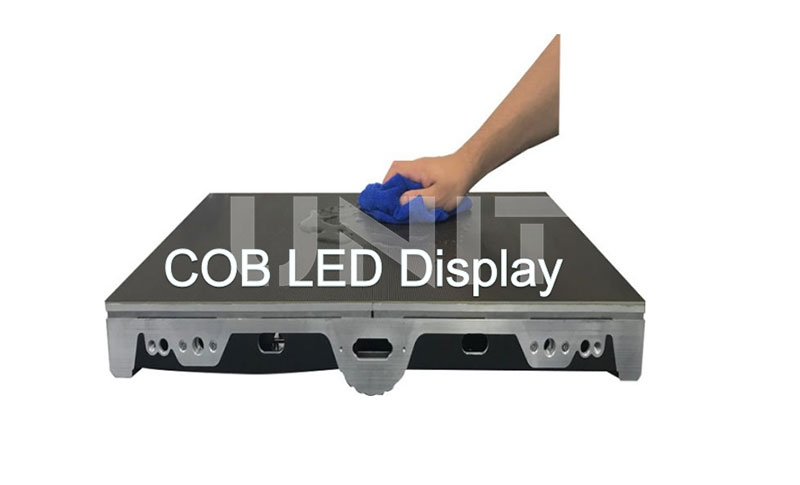
External Cleaning
Purpose: To maintain display clarity and visual appeal.
Steps:
Use a soft, dry, non-woven cloth to clean the surface.
Avoid chemical solvents like alcohol or acetone, which may damage protective coatings.
Clean weekly, or more often in dusty environments.
Hardware Inspection
Scope: Covers LED modules, power supply units, and signal cables.
Routine Checks:
Look for loose, deformed, or damaged modules.
Check the power supply for signs of overheating, noise, or burning smell.
Inspect cables for wear, cracks, or exposed wiring.
Recommended Frequency:
Monthly for standard setups.
Bi-weekly for high-traffic or mission-critical environments.
Software Updates and System Optimization
Keeping your display control software up to date ensures optimal performance and stability.
Steps:
Back up the current settings and display content before upgrading.
Update to the latest version from your manufacturer.
After the update, test all display functions.
Adjust brightness, color balance, and contrast as needed for best visuals.
Why Proper Maintenance Matters for COB LED Displays
Investing in a high-end display means nothing without proper usage and care.
Through routine checks and timely issue resolution, you not only protect your investment but also provide consistent high-quality visuals to your audience.
Benefits of Maintenance:
- Extends lifespan of the LED COB display screen
- Reduces downtime caused by technical failures
- Ensures stable and clear visuals for marketing or information display
- Lowers long-term repair costs by catching early faults
Conclusion
COB LED displays offer stunning visual performance—but only when properly maintained and used.
By understanding common problems like dead pixels, brightness inconsistency, or signal distortion, and by applying the right solutions, you can extend the life and effectiveness of your display.
Regular maintenance, from environmental control to hardware checks and software updates, ensures that your screen remains in top shape—delivering vibrant, uniform visuals every time.
Need help with COB display setup or troubleshooting? Reach out to your manufacturer’s support team or consult a qualified technician for expert assistance.