
In LED display technology, understanding LED display pixel pitch is essential for achieving the best visual performance in different viewing environments. Pixel pitch directly affects the clarity, resolution, and optimal viewing distance of an LED screen, making it one of the most important factors when selecting a display solution.
In this guide, we will explain what LED display pixel pitch is, why it matters for image quality, and how it influences viewing distance, screen resolution, and application scenarios. You will also learn practical tips for choosing the right LED pixel pitch for indoor and outdoor LED displays, helping you make the best decision for your project.
Table of Contents
1. What Is LED Display Pixel Pitch?
LED display pixel pitch (sometimes “dot pitch”) is the distance, measured in millimeters, between the centers of two adjacent pixels on an LED display. It is one of the most critical specifications of any LED screen because it establishes the display's fundamental pixel density and, therefore, how sharp or coarse the image appears.
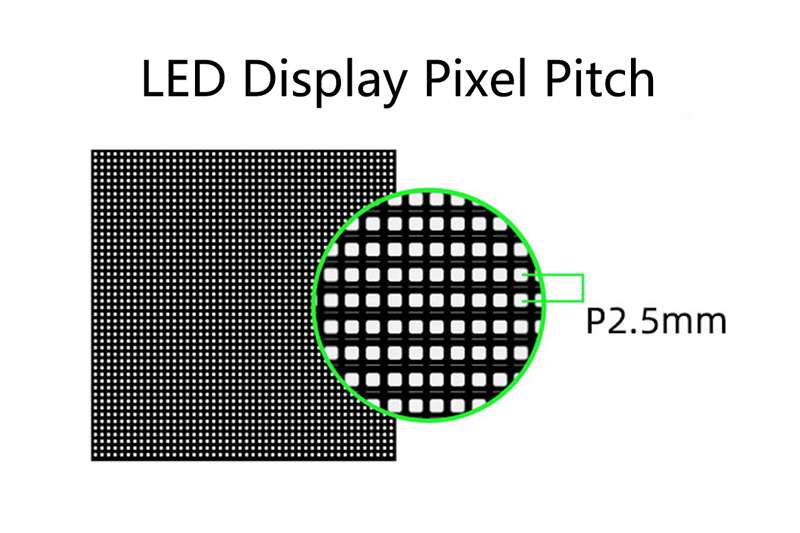
In the LED industry, LED pixel pitch is written as "P" followed by a number. An LED display labeled P2.5 has a pixel pitch of 2.5 mm. The smaller the "P" number, the finer the display. Conversely, larger LED pitch (e.g. P10, P16) means fewer pixels per area and is suited to long-distance viewing.
Higher density (fine pitch) → more detail, closer viewing distance, higher cost.
Lower density (coarse pitch) → suitable only at distance, lower cost, larger LEDs and often higher brightness.
How LED Video Wall Pixel Pitch Is Physically Measured?
LED screen pixel pitch is measured from the center of one LED cluster to the center of the nearest neighboring pixel cluster in any direction.
This center-to-center measurement is the same whether you measure horizontally or vertically, as most LED displays use a square pixel grid.
2. Why Pixel Pitch Matters for LED Displays?
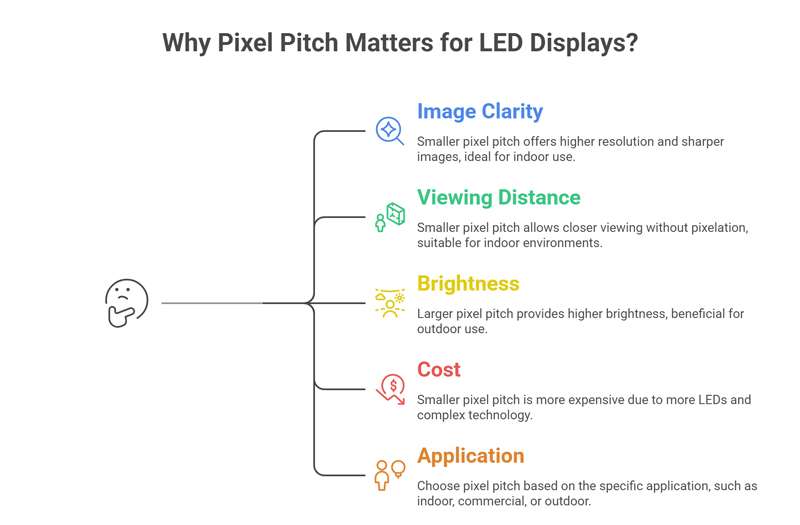
LED pixel pitch plays a crucial role in determining the overall performance and visual quality of an LED screen. It affects several critical factors in LED video walls: image resolution and clarity, minimum viewing distance, brightness requirements, power consumption, and overall cost.
- Image Clarity and Resolution
One of the most important reasons pixel pitch matters is its direct influence on screen resolution and image clarity. A smaller pixel pitch means the pixels are placed closer together, resulting in higher pixel density. This allows the LED display to present sharper images, smoother graphics, and more detailed video content.
For example, a P2.5 LED display contains significantly more pixels per square meter than a P5 LED display, which means it can deliver much higher resolution on the same screen size.
- Optimal Viewing Distance
LED pixel pitch also determines the minimum comfortable viewing distance of an LED display. Screens with a smaller pixel pitch can be viewed from a much closer distance without visible pixelation. In contrast, displays with larger pixel pitch are designed for longer viewing distances.
A common rule used in the LED display industry is:
Minimum Viewing Distance (meters) ≈ Pixel Pitch (mm)
For instance:
- P2.5 LED display → optimal viewing distance about 2.5 meters
- P4 LED display → optimal viewing distance about 4 meters
- P10 LED display → optimal viewing distance about 10 meters
This is why fine pixel pitch LED displays are commonly used for indoor environments such as meeting rooms, control centers, and retail stores.
- Brightness and Energy Efficiency
Displays with larger pixel pitches have fewer LEDs per square meter, which often results in higher peak brightness, an important advantage for outdoor environments where sunlight competition is intense. Fine-pitch indoor displays, by contrast, are optimized for lower brightness with richer color accuracy in controlled lighting conditions.
- Cost
Another important factor affected by LED wall pixel pitch is display cost. Smaller pixel pitch screens require more LED chips, higher manufacturing precision, and more complex driving technology.
As a result, fine-pitch LED displays typically cost more per square meter than larger-pitch displays. As a rough benchmark, a P1.2 display typically costs 30–40% more per square meter than a comparable P2.5 display.
Choosing the right pixel pitch helps balance image quality, viewing distance, and project budget.
- Application Scenarios
Different LED display applications require different pixel pitches:
- Indoor LED displays: usually P0.9 – P3 for close viewing
- Commercial digital signage: typically P2.5 – P4
- Outdoor advertising billboards: commonly P6 – P10 or larger
Key Insight: Smaller pixel pitch is not always better. The best LED display pixel pitch is the one that matches your viewing distance and environment, not the lowest number you can afford.
3. Pixel Pitch vs Pixel Density vs Resolution
When choosing an LED display, many buyers confuse LED display pixel pitch, pixel density, and resolution. These three factors are closely connected, but they serve different purposes when evaluating LED display performance.
3.1 Pixel Pitch vs Pixel Density
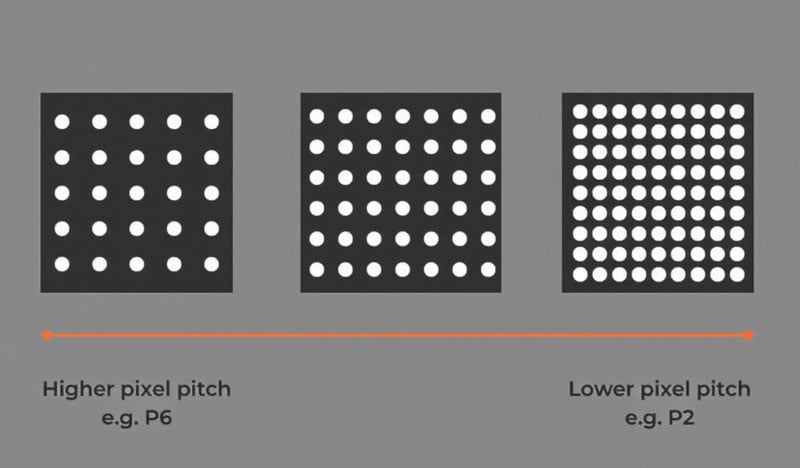
Pixel density describes how many pixels fit within a given area, while pixel pitch describes the physical spacing between them. A smaller pixel pitch means higher pixel density, which means more detail per square meter.
Their relationship is straightforward:
Smaller pixel pitch = Higher pixel density
For example:
P2.5 LED display → very high pixel density → sharper image
P10 LED display → lower pixel density → suitable for long-distance viewing
It can be calculated using this formula:
Pixel Density = (1000 ÷ Pixel Pitch)²
Here is a table of pixel density for different LED pixel pitches:
| Pixel Pitch (mm) | How to Calculate | Pixel Density (pixels/m²) |
| P2.5 | (1000 ÷ 2.5)² = 400² | 160,000 |
| P2.0 | (1000 ÷ 2.0)² = 500² | 250,000 |
| P1.86 | (1000 ÷ 1.86)² ≈ 538² | 289,444 |
| P1.53 | (1000 ÷ 1.53)² ≈ 654² | 427,716 |
| P1.25 | (1000 ÷ 1.25)² = 800² | 640,000 |
This is why fine pixel pitch LED displays are ideal for close-range applications like control rooms and retail displays.
3.2 Pixel Pitch vs Resolution
Pixel pitch and resolution are often confused, but they are not the same. LED screen pixel pitch determines how many pixels can fit into a screen. LED screen resolution refers to the total number of pixels on the entire LED display, expressed as:
Width (pixels) × Height (pixels)
Example:
4m × 2m screen with P2.5 → much higher resolution
4m × 2m screen with P5 → lower resolution
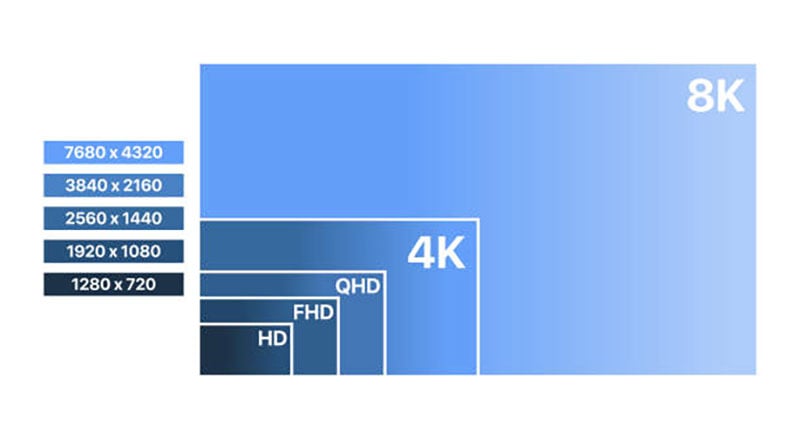
Unlike pixel pitch and density, resolution depends on both pixel pitch and screen size.
Formula:
Width resolution = Screen width (mm) ÷ Pixel pitch
Height resolution = Screen height (mm) ÷ Pixel pitch
3.3 Pixel Density vs Resolution
Although both relate to image detail, they apply at different levels:
Pixel density → detail per unit area
Resolution → total detail of the entire screen
Two screens can have the same pixel density but different resolutions if their sizes are different.
3.4 Key Differences at a Glance
| Factor | Pixel Pitch | Pixel Density | Resolution |
| Definition | Distance between pixels | Pixels per square meter | Total pixels on screen |
| Unit | Millimeters (mm) | Pixels/m² | Pixels (W × H) |
| Affects | Viewing distance | Image detail | Overall display clarity |
| Depends on | LED design | Pixel pitch | Pitch + screen size |
| Smaller Value → | Higher quality | Higher density | Higher resolution (same size) |
3.5 How They Work Together
These three factors are interconnected:
- Pixel pitch determines pixel density
- Pixel density influences image sharpness
- Resolution defines total visual detail based on screen size
In simple terms:
Smaller pixel pitch → higher density → higher resolution → better image quality
However, this also leads to a higher cost, so the key is to balance performance with your actual viewing distance and application.
4. Pixel Pitch vs Viewing Distance
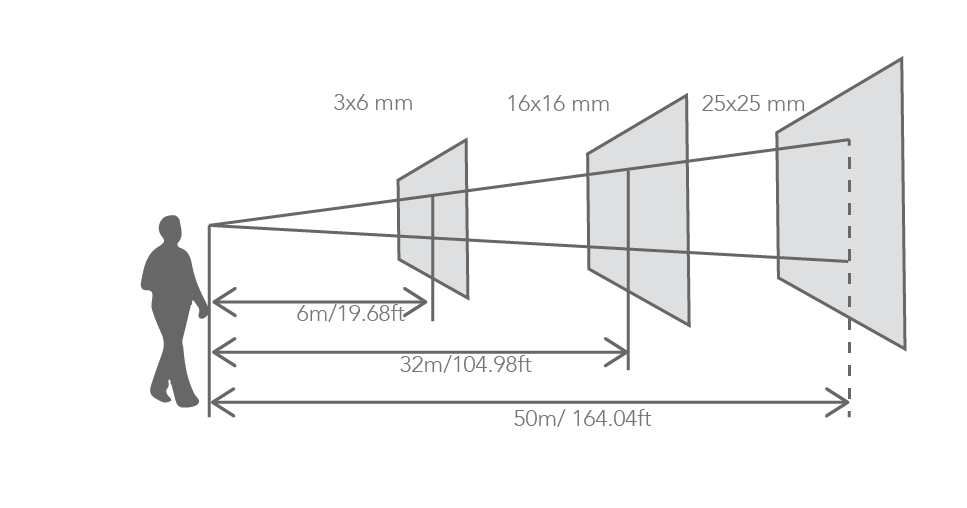
Understanding the relationship between LED display pixel pitch and viewing distance is essential for choosing the right LED screen. Even the highest-resolution display will look ineffective if the pixel pitch does not match the actual viewing distance.
4.1 Basic Formula for Viewing Distance
In the LED display industry, a commonly used rule of thumb is:
Minimum Viewing Distance (meters) ≈ Pixel Pitch (mm)
This formula provides a quick way to estimate whether a specific pixel pitch is suitable for your project.
4.2 Recommended Viewing Distance Chart
To make selection easier, here is a practical reference table for common LED pixel pitches:
| Pixel Pitch | Min Viewing Distance | Optimal Range | Typical Application | Environment |
| P0.9 | 0.9 m | 0.9–2.7 m | Broadcast studios, luxury retail | Indoor |
| P1.2 | 1.2 m | 1.2–3.6 m | Control rooms, premium showrooms | Indoor |
| P1.5 | 1.5 m | 1.5–4.5 m | Conference rooms, museum displays | Indoor |
| P1.9 / P2 | 2 m | 2–6 m | Corporate lobbies, event backdrops | Indoor |
| P2.5 | 2.5 m | 2.5–7.5 m | Retail, exhibition halls | Indoor |
| P3 | 3 m | 3–9 m | Stage events, trade shows | Indoor / Rental |
| P4 | 4 m | 4–12 m | Indoor arenas, semi-outdoor | Indoor / Semi-outdoor |
| P5 | 5 m | 5–15 m | Large indoor venues, outdoor entry | Indoor / Outdoor |
| P6 | 6 m | 6–18 m | Outdoor advertising, building facades | Outdoor |
| P8 | 8 m | 8–24 m | Outdoor billboards, transit displays | Outdoor |
| P10 | 10 m | 10–30 m | Highways, stadiums, large facades | Outdoor |
| P16 / P20 | 16–20 m | 16–60 m | Giant outdoor screens, sports venues | Outdoor |
Choosing the wrong LED pixel pitch for your viewing distance can lead to two common problems:
Too large pixel pitch (too close viewing):
Visible gaps between pixels, poor image quality, and reduced visual impact
Too small pixel pitch (too far viewing):
Unnecessary cost without noticeable improvement in image quality
The goal is to match pixel pitch with real viewing distance to achieve the best balance between performance and cost.
5. Indoor vs Outdoor LED Screen Pixel Pitch Differences
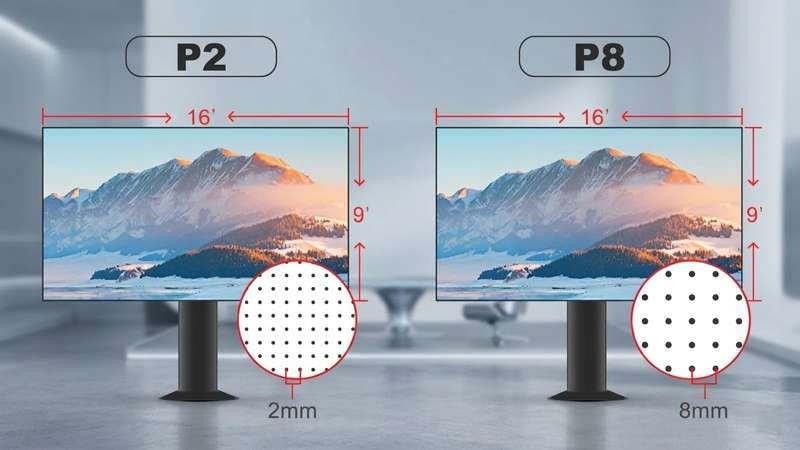
When selecting an LED display, one of the most important decisions is choosing between indoor and outdoor applications. The required LED display pixel pitch can vary significantly depending on the installation environment, viewing distance, and brightness requirements.
5.1 Key Differences Between Indoor vs Outdoor LED Pixel Pitch
Indoor and outdoor LED displays are designed for completely different viewing conditions:
Indoor LED displays are typically viewed from short distances, requiring smaller pixel pitch for higher clarity. Smaller pixel pitch ensures:
- Sharper text readability
- Smooth image transitions
- Better viewing experience at close range
This is why fine pixel pitch LED displays (P1.2 – P2.5) are widely used indoors.
Outdoor LED displays are typically installed in areas like highways, building facades, and stadiums, where viewers are far away.
Larger pixel pitch works better because:
- Viewing distance is longer, so pixel gaps are less noticeable
- Lower pixel density reduces overall cost
- Higher brightness is prioritized over ultra-high resolution
For most outdoor projects, P6, P8, or P10 LED displays are the most cost-effective choices.
Here is a quick comparison of common pixel pitch ranges:
| Application Type | Typical Pixel Pitch | Viewing Distance | Key Features |
| Indoor LED | P0.9 – P3 | 1 m – 6 m | High resolution, close viewing |
| Semi-outdoor | P3 – P5 | 3 m – 10 m | Balanced performance & cost |
| Outdoor LED | P6 – P10+ | 6 m – 50 m+ | High brightness, weather resistance |
6. How to Calculate and Choose the Best LED Display Pixel Pitch?
Choosing the right LED video wall pixel pitch involves more than just picking the smallest number. It requires understanding both the technical calculation and the practical application to ensure your display delivers optimal clarity, performance, and value.
https://youtu.be/Z_EQ852Lkpg?si=34ggI9Dx10nCI0uPStep 1. Determine Viewing Distance and Resolution Requirements
Start with the viewing distance, as this is the most critical factor. Shorter distances require finer pixel pitch, while larger distances allow for coarser pitches.
- Indoor displays: 1–6 meters
- Outdoor displays: 10 meters or more
Next, define the resolution requirements based on your content:
- Standard HD: 1280 × 720
- Full HD: 1920 × 1080
- Higher-end: 2K / 4K content
Higher resolution requires more pixels per unit area, meaning a smaller pixel pitch for the same screen size.
Step 2. Calculate LED Pixel Pitch
If you know your screen width and resolution, you can calculate the pixel pitch using:
Pixel Pitch (mm) = Screen Width (mm) ÷ Horizontal Resolution (pixels)
Example:
- Outdoor screen width: 4000 mm
- Full HD width: 1920 pixels
Calculation: 4000 ÷ 1920 ≈ 2.08 mm → Choose a P2.0 or P2.5 LED display.
Alternatively, for viewing distance-based calculation:
- Pixel Pitch (mm) ≈ Minimum Viewing Distance (m)
- Viewer 10 m away → pixel pitch ~10 mm (P10)
- Viewer 3 m away → pixel pitch ~3 mm (P3)
This gives a practical baseline before fine-tuning for resolution.
Step 3. Consider Application Scenario
After calculation, match the LED screen pixel pitch to real-world applications:
| Application | Recommended Pixel Pitch | Viewing Distance |
| Control rooms / broadcast studios | P0.9 – P1.8 | 1 – 3 m |
| Meeting rooms / corporate displays | P1.5 – P2.5 | 1.5 – 4 m |
| Retail / indoor advertising | P2.5 – P4 | 2.5 – 6 m |
| Rental & events | P3 – P5 | 3 – 10 m |
| Outdoor billboards / building facades | P6 – P10+ | 10 m+ |
Tip: The best pixel pitch balances clarity, content type, viewing distance, and budget. Choosing too small a pitch can unnecessarily increase costs, while too large a pitch reduces visual impact.
Step 4. Match Pixel Pitch with Content Type
Text-heavy or detailed graphics: Smaller pixel pitch (P0.9 – P2.5)
Video, branding, or outdoor signage: Medium to larger pixel pitch (P3 – P10+)
Step 5. Quick Decision Flow
Identify the closest viewing distance.
Calculate the theoretical LED pixel pitch using LED screen size and resolution.
Adjust based on application scenario and content type.
Compare with budget constraints.
Select the most practical pixel pitch (not necessarily the smallest).
Step 6. Practical Example
Scenario: Outdoor LED billboard, Full HD content, viewers ~10 meters away.
Calculation: Pixel Pitch ≈ Viewing Distance ÷ Resolution Width = 10 m ÷ 1920 ≈ 5.2 mm
Decision: Choose P5 or P6 outdoor LED display to balance clarity and cost.
7. Best LED Pixel Pitch Recommendations by Application
Choosing the right LED display pixel pitch depends heavily on where and how the screen will be used. To make your decision easier, here’s a practical guide with recommended pixel pitch ranges for common applications in 2026.
7.1 Indoor Applications
Indoor LED displays are viewed from short distances and often show detailed content such as text, charts, or HD video. A smaller pixel pitch ensures clarity and smooth visuals.
| Application | Recommended Pixel Pitch | Ideal Viewing Distance | Suggested Product Examples |
| Control rooms / broadcast studios | P0.9 – P1.8 | 1 – 3 m | P1.25 Indoor LED Module |
| Meeting rooms / corporate displays | P1.5 – P2.5 | 1.5 – 4 m | P2.5 Indoor LED Module |
| Retail stores / shopping malls | P2.5 – P4 | 2.5 – 6 m | P3 Indoor LED Display |
7.2 Event & Rental LED Displays
Rental and event screens require flexibility and high visibility for medium-range viewing. These screens need a balance between pixel pitch, portability, and cost.
| Application | Recommended Pixel Pitch | Ideal Viewing Distance | Suggested Product Examples |
| Exhibition halls | P2.5 – P4 | 2 – 6 m | P3.91 Rental LED Display |
| Stage & concert LED walls | P3 – P5 | 3 – 10 m | P4 Outdoor/Indoor LED Display |
7.3 Outdoor Applications
Outdoor LED screens are usually viewed from a distance and must handle high brightness, weather resistance, and long-term durability. Larger pixel pitch reduces cost without compromising visibility.
| Application | Recommended Pixel Pitch | Ideal Viewing Distance | Suggested Product Examples |
| Building facades / billboards | P6 – P10+ | 6 – 50 m+ | P8 Outdoor LED Display |
| Stadium / sports arenas | P6 – P10 | 10 – 50 m+ | P10 Outdoor LED Screen |
| Highway / roadside signage | P8 – P16 | 20 – 100 m | Large Outdoor LED Billboard |
The “best” LED display pixel pitch is not always the smallest. It’s the one that fits your application, viewing distance, content type, and budget. By following these recommendations, you can ensure that your LED display delivers optimal clarity, impact, and value, whether it’s for indoor, outdoor, or rental use.
8. FAQs
Q1. What is a good pixel pitch for an indoor LED display?For most commercial indoor installations, P1.9 to P2.5 is the recommended range. It delivers sharp, high-definition visuals for viewing distances of 3–8 meters, covering the majority of retail, corporate, and event applications, at a significantly lower cost than ultra-fine pitch options. For viewing distances consistently under 2 meters, consider P1.2–P1.5.
.elementskit-card END Q2. What pixel pitch do I need for a 4K LED video wall?Achieving true 4K (3840×2160) resolution depends on both pixel pitch and screen dimensions. For a standard 4 m × 2.25 m screen, you need approximately P1.04mm pitch to hit 4K.
In practice, "perceptually 4K", where the human eye can no longer resolve individual pixels, is achieved by matching pitch to viewing distance using the formulas in Section 4. A P2 display viewed from 3+ meters delivers the same perceived sharpness as a P1 display viewed from 3+ meters.
.elementskit-card END Q3. Is P2.5 good for indoor LED displays?Yes, P2.5 is one of the most widely deployed indoor pixel pitches globally. It provides excellent image clarity for viewing distances starting at 2.5 meters, strong color uniformity, and competitive pricing due to high manufacturing volume. It is the go-to recommendation for retail, corporate, and mid-scale event applications.
.elementskit-card END Q4. How do I calculate pixel pitch from viewing distance?Use this simple formula: Maximum Pixel Pitch (mm) = Minimum Viewing Distance (m). For a more comfortable result that accounts for typical content types, apply: Recommended Pitch (mm) = Minimum Viewing Distance (m) ÷ 1.5. Example: if your closest viewers are 6 meters away, your maximum acceptable pitch is P6, and your comfortable recommendation is P4.
.elementskit-card END Q5. What is the difference between P2 and P2.5 LED displays?The difference is pixel density: P2 has approximately 250,000 pixels/m² while P2.5 has 160,000 pixels/m² — a 56% increase in pixel count. P2 allows comfortable viewing from 2 meters; P2.5 from 2.5 meters.
In practice, for viewers at 4+ meters, both displays appear identical. P2.5 is typically 15–25% cheaper and is the better choice for most applications where the minimum viewing distance exceeds 3 meters.
.elementskit-card END Q6. What pixel pitch is best for outdoor advertising billboards?For typical roadside billboards viewed from 15–30 meters, P8 to P10 is the standard industry recommendation. It delivers excellent visual clarity at these distances, provides high brightness (6,000–8,000 nits) for sunlit environments, and offers the best cost-per-square-meter value for large format installations. For closer outdoor viewing (under 10 meters), consider P5 or P6.
.elementskit-card END Q7. Does a smaller pixel pitch always cost more?Yes, across the LED industry, cost per square meter rises sharply as pixel pitch decreases. Each 1mm reduction in pitch requires more LED chips, more complex driver circuits, and more precise manufacturing, all of which compound the cost.
.elementskit-card END9. Conclusion
LED display pixel pitch is the technical specification that sits at the intersection of visual performance, viewing experience, and project economics. Getting it right doesn't require the smallest number, it requires the right number for your specific application.
Whether you're configuring a broadcast studio, a corporate lobby, a retail facade, or a highway billboard, the right LED pixel pitch makes your investment work exactly as intended.